
3.5 Short-term Memory
本节介绍 LangChain 中的短期记忆机制。
什么是短期记忆?
短期记忆(Short-term Memory) 让 AI Agent 能够记住单次对话中的之前交互。对于 AI Agent 来说,记忆至关重要,因为它能让 Agent:
- 记住之前的交互内容
- 从反馈中学习
- 适应用户偏好
"Memory is a system that remembers information about previous interactions."
为什么需要短期记忆?
长对话对当今的 LLM 是一个挑战:
- 完整的对话历史可能超出 LLM 的上下文窗口
- 导致信息丢失或错误
- 需要有效的记忆管理策略
基本实现
要启用短期记忆,需要在创建 Agent 时指定 checkpointer:
python
from langchain.agents import create_agent
from langgraph.checkpoint.memory import InMemorySaver

# 创建内存检查点
checkpointer = InMemorySaver()

agent = create_agent(
    "gpt-4o",
    tools=[get_user_info],
    checkpointer=checkpointer,
)

# 使用线程 ID 来维护对话状态
config = {"configurable": {"thread_id": "user-123"}}

# 第一次对话
response1 = agent.invoke(
    {"messages": [{"role": "user", "content": "我叫张三"}]},
    config=config
)

# 第二次对话 - Agent 会记住用户名字
response2 = agent.invoke(
    {"messages": [{"role": "user", "content": "我叫什么名字?"}]},
    config=config
)
# Agent 会回答: "你叫张三"生产环境配置
对于生产环境,使用数据库持久化的检查点:
PostgreSQL 检查点
python
from langgraph.checkpoint.postgres import PostgresSaver

DB_URI = "postgresql://user:password@localhost:5432/mydb"

with PostgresSaver.from_conn_string(DB_URI) as checkpointer:
    checkpointer.setup()  # 创建必要的表

    agent = create_agent(
        "gpt-4o",
        tools=[get_user_info],
        checkpointer=checkpointer,
)SQLite 检查点
python
from langgraph.checkpoint.sqlite import SqliteSaver

with SqliteSaver.from_conn_string("memory.db") as checkpointer:
    checkpointer.setup()

    agent = create_agent(
        "gpt-4o",
        tools=[my_tools],
        checkpointer=checkpointer,
)记忆管理策略
随着对话增长,需要管理消息历史以避免超出上下文限制。LangChain 提供三种主要策略:
1. 修剪消息(Trim Messages)
在达到上下文限制之前移除较老的消息:
python
from langchain_core.messages import trim_messages
from langchain_openai import ChatOpenAI

model = ChatOpenAI(model="gpt-4o")

# 使用 token 计数策略修剪消息
trimmer = trim_messages(
    max_tokens=4000,
    strategy="last",  # 保留最近的消息
    token_counter=model,
    include_system=True,  # 始终保留系统消息
)

# 应用到消息列表
trimmed = trimmer.invoke(messages)使用中间件装饰器:
python
from langchain.agents import before_model

@before_model
def trim_before_model(state, config):
    """在调用模型前修剪消息"""
    messages = state["messages"]
    # 只保留最近 10 条消息
    if len(messages) > 10:
        # 保留系统消息和最近的消息
        system_msgs = [m for m in messages if m.type == "system"]
        recent_msgs = messages[-9:]
        state["messages"] = system_msgs + recent_msgs
return state2. 删除消息(Delete Messages)
使用 RemoveMessage 删除特定消息:
python
from langchain_core.messages import RemoveMessage

# 从状态中删除特定消息
def delete_old_messages(state):
    messages = state["messages"]
    # 删除超过 20 条的旧消息
    if len(messages) > 20:
        messages_to_delete = messages[1:-19]  # 保留第一条和最近 19 条
        return {
            "messages": [
                RemoveMessage(id=m.id) for m in messages_to_delete
            ]
        }
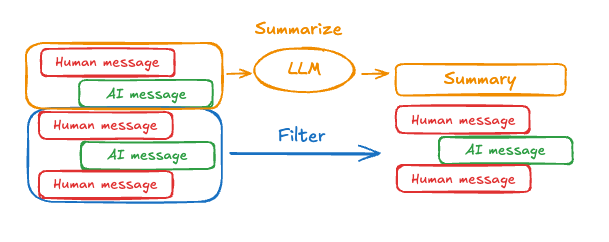
return {}3. 消息摘要(Summarize Messages)
使用 LLM 智能压缩对话历史,同时保留关键信息:
python
from langchain.agents import SummarizationMiddleware
from langchain_openai import ChatOpenAI

# 创建摘要中间件
summarization = SummarizationMiddleware(
    model=ChatOpenAI(model="gpt-4o"),
    max_messages=10,  # 超过 10 条消息时触发摘要
    summary_prompt="请简洁地总结以下对话的关键点:",
)

agent = create_agent(
    "gpt-4o",
    tools=[my_tools],
    checkpointer=checkpointer,
    middleware=[summarization],
)自定义状态管理
扩展 AgentState 以添加应用特定的字段:
python
from langchain.agents import AgentState
from typing import Optional

class CustomAgentState(AgentState):
    """自定义 Agent 状态"""
    user_id: str
    preferences: dict
    conversation_summary: Optional[str] = None
    interaction_count: int = 0

# 在 Agent 中使用自定义状态
agent = create_agent(
    "gpt-4o",
    tools=[my_tools],
    state_schema=CustomAgentState,
    checkpointer=checkpointer,
)记忆访问方式
在工具中访问
使用 ToolRuntime 参数访问和修改状态:
python
from langchain_core.tools import tool
from langchain.agents import ToolRuntime

@tool
def save_user_preference(
    preference: str,
    runtime: ToolRuntime
) -> str:
    """保存用户偏好"""
    # 访问当前状态
    state = runtime.state

    # 更新偏好
    if "preferences" not in state:
        state["preferences"] = {}
    state["preferences"]["latest"] = preference

    # 状态会自动保存
return f"已保存偏好: {preference}"在中间件中访问
python
from langchain.agents import before_model, after_model

@before_model
def inject_context(state, config):
    """在模型调用前注入上下文"""
    # 根据状态修改系统消息
    if state.get("user_id"):
        user_context = f"当前用户 ID: {state['user_id']}"
        # 添加到消息中
    return state

@after_model
def track_response(state, response, config):
    """在模型响应后追踪"""
    state["interaction_count"] = state.get("interaction_count", 0) + 1
return state在提示词中访问
使用 @dynamic_prompt 创建上下文感知的系统提示:
python
from langchain.agents import dynamic_prompt

@dynamic_prompt
def context_aware_prompt(state, config):
    """根据对话状态生成动态提示词"""
    base_prompt = "你是一个有帮助的助手。"

    # 如果有对话摘要,添加到提示中
    if state.get("conversation_summary"):
        base_prompt += f"\n\n之前的对话摘要:{state['conversation_summary']}"

    # 如果知道用户偏好
    if state.get("preferences"):
        prefs = state["preferences"]
        base_prompt += f"\n\n用户偏好:{prefs}"

return base_prompt线程管理
使用线程 ID 区分不同的对话:
python
# 用户 A 的对话
config_a = {"configurable": {"thread_id": "user-a-session-1"}}
agent.invoke({"messages": [...]}, config=config_a)

# 用户 B 的对话(独立的记忆)
config_b = {"configurable": {"thread_id": "user-b-session-1"}}
agent.invoke({"messages": [...]}, config=config_b)

# 用户 A 的新会话(新的记忆)
config_a_new = {"configurable": {"thread_id": "user-a-session-2"}}
agent.invoke({"messages": [...]}, config=config_a_new)最佳实践
| 场景 | 推荐策略 |
|---|---|
| 简短对话 | 无需特殊处理,直接使用完整历史 |
| 中等长度对话 | 使用消息修剪,保留最近 N 条 |
| 长对话 | 使用消息摘要,压缩历史 |
| 多轮任务 | 结合摘要 + 保留关键消息 |
| 生产环境 | 使用数据库持久化检查点 |
短期记忆 vs 长期记忆
| 特性 | 短期记忆 | 长期记忆 |
|---|---|---|
| 范围 | 单次对话/会话 | 跨多次会话 |
| 存储 | Checkpointer | 向量数据库/知识库 |
| 用途 | 对话上下文 | 用户画像、历史知识 |
| 生命周期 | 会话结束后可清除 | 持久保存 |
总结
短期记忆是构建有状态 AI Agent 的基础:
- 使用 Checkpointer - 启用状态持久化
- 选择合适的策略 - 根据对话长度选择修剪/删除/摘要
- 合理使用线程 ID - 区分不同用户和会话
- 生产环境用数据库 - 确保数据持久性和可扩展性
上一节:3.4 Tools
下一节:3.6 Streaming