
多智能体网络协作(Multi-agent Network)
概述
单个 Agent 通常可以在单一领域内使用少量工具有效运作,但即使使用像 gpt-4 这样强大的模型,在使用多种工具时效果也会下降。
处理复杂任务的一种方法是采用 "分而治之" 策略:为每个任务或领域创建专门的 Agent,并将任务路由到正确的"专家"。这是 多智能体网络 架构的一个示例。
本教程受论文 AutoGen: Enabling Next-Gen LLM Applications via Multi-Agent Conversation(Wu 等人)启发,展示了如何使用 LangGraph 实现这种模式。
最终的图结构如下所示:
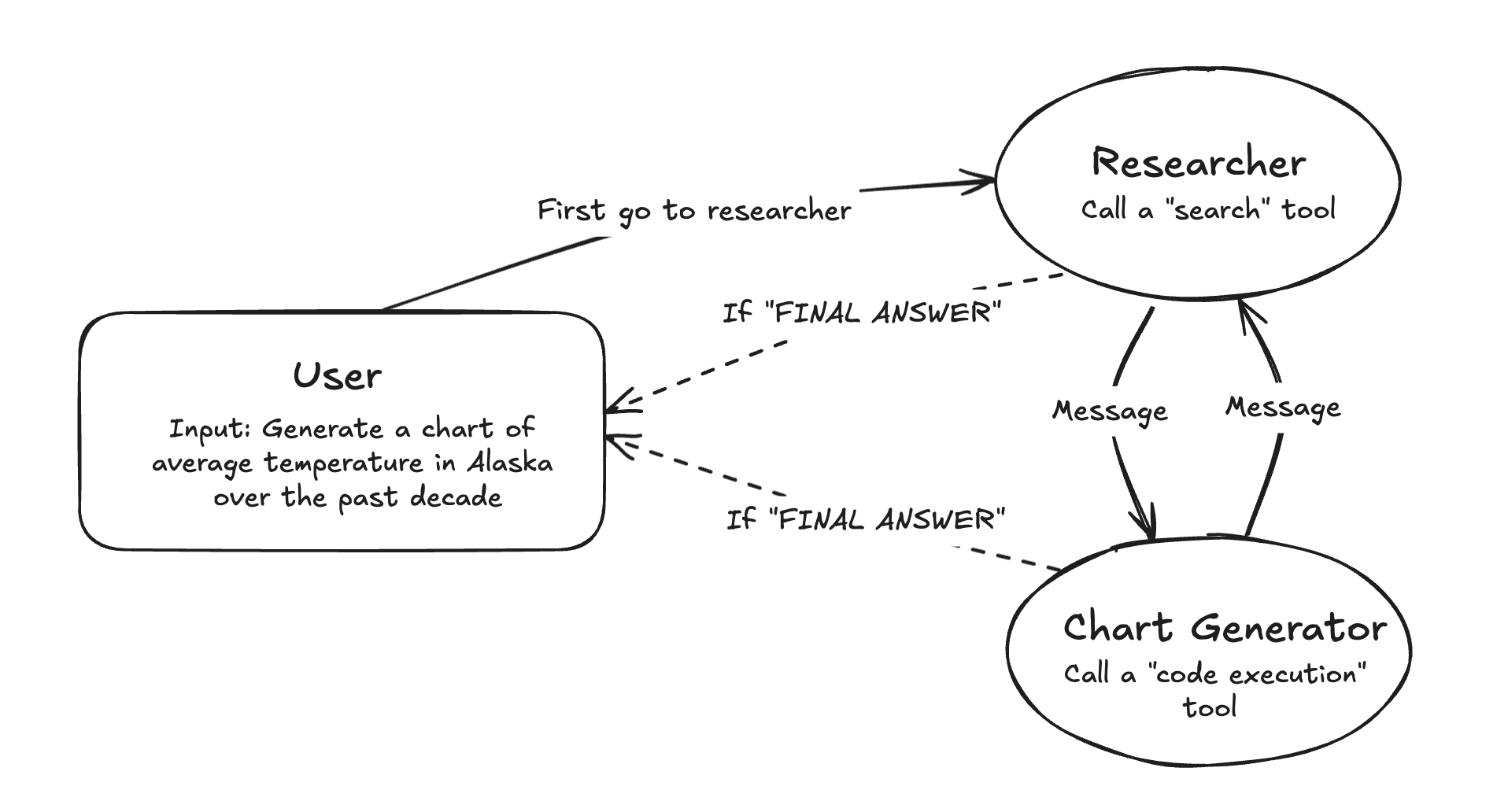 图 1:多智能体网络架构图
环境设置
首先,安装所需的包并设置 API 密钥:
bash
pip install -U langchain_community langchain_anthropic langchain-tavily langchain_experimental matplotlib langgraphpython
import getpass
import os


def _set_if_undefined(var: str):
    if not os.environ.get(var):
        os.environ[var] = getpass.getpass(f"Please provide your {var}")


_set_if_undefined("ANTHROPIC_API_KEY")
_set_if_undefined("TAVILY_API_KEY")提示:建议注册 LangSmith 来调试、测试和监控你的 LangGraph 项目。
定义工具
我们将定义 Agent 将来使用的一些工具:
python
from typing import Annotated

from langchain_tavily import TavilySearch
from langchain_core.tools import tool
from langchain_experimental.utilities import PythonREPL

# Tavily 搜索工具
tavily_tool = TavilySearch(max_results=5)

# Python REPL 工具
# 警告:这会在本地执行代码,在未沙盒化的情况下可能不安全
repl = PythonREPL()


@tool
def python_repl_tool(
    code: Annotated[str, "The python code to execute to generate your chart."],
):
    """Use this to execute python code. If you want to see the output of a value,
    you should print it out with `print(...)`. This is visible to the user."""
    try:
        result = repl.run(code)
    except BaseException as e:
        return f"Failed to execute. Error: {repr(e)}"
    result_str = f"Successfully executed:\n\`\`\`python\n{code}\n\`\`\`\nStdout: {result}"
    return (
        result_str + "\n\nIf you have completed all tasks, respond with FINAL ANSWER."
)工具说明
| 工具 | 用途 |
|---|---|
TavilySearch | 网络搜索工具,用于研究任务 |
python_repl_tool | Python 代码执行工具,用于生成图表 |
创建图
定义好工具和辅助函数后,我们将创建各个 Agent 并使用 LangGraph 告诉它们如何相互通信。
定义 Agent 节点
首先,创建一个工具函数来为每个 Agent 生成系统提示词:
python
def make_system_prompt(suffix: str) -> str:
    return (
        "You are a helpful AI assistant, collaborating with other assistants."
        " Use the provided tools to progress towards answering the question."
        " If you are unable to fully answer, that's OK, another assistant with different tools "
        " will help where you left off. Execute what you can to make progress."
        " If you or any of the other assistants have the final answer or deliverable,"
        " prefix your response with FINAL ANSWER so the team knows to stop."
        f"\n{suffix}"
)核心代码:创建 Agent 节点
python
from typing import Literal

from langchain_core.messages import BaseMessage, HumanMessage
from langchain_anthropic import ChatAnthropic
from langgraph.prebuilt import create_react_agent
from langgraph.graph import MessagesState, END
from langgraph.types import Command


llm = ChatAnthropic(model="claude-3-5-sonnet-latest")


def get_next_node(last_message: BaseMessage, goto: str):
    """根据消息内容决定下一个节点"""
    if "FINAL ANSWER" in last_message.content:
        # 任何 Agent 决定工作完成
        return END
    return goto


# ==================== 研究 Agent ====================
research_agent = create_react_agent(
    llm,
    tools=[tavily_tool],
    prompt=make_system_prompt(
        "You can only do research. You are working with a chart generator colleague."
    ),
)


def research_node(
    state: MessagesState,
) -> Command[Literal["chart_generator", END]]:
    """研究节点:执行研究任务,然后路由到图表生成器"""
    result = research_agent.invoke(state)
    goto = get_next_node(result["messages"][-1], "chart_generator")
    # 将 AI 消息包装为 HumanMessage,因为不是所有提供商都允许
    # AI 消息作为输入消息列表的最后一个位置
    result["messages"][-1] = HumanMessage(
        content=result["messages"][-1].content, name="researcher"
    )
    return Command(
        update={
            # 与其他 Agent 共享研究 Agent 的内部消息历史
            "messages": result["messages"],
        },
        goto=goto,
    )


# ==================== 图表生成 Agent ====================
# 注意:这会执行任意代码,在未沙盒化的情况下可能不安全
chart_agent = create_react_agent(
    llm,
    [python_repl_tool],
    prompt=make_system_prompt(
        "You can only generate charts. You are working with a researcher colleague."
    ),
)


def chart_node(state: MessagesState) -> Command[Literal["researcher", END]]:
    """图表生成节点:生成图表,然后路由回研究者或结束"""
    result = chart_agent.invoke(state)
    goto = get_next_node(result["messages"][-1], "researcher")
    # 将 AI 消息包装为 HumanMessage
    result["messages"][-1] = HumanMessage(
        content=result["messages"][-1].content, name="chart_generator"
    )
    return Command(
        update={
            # 与其他 Agent 共享图表 Agent 的内部消息历史
            "messages": result["messages"],
        },
        goto=goto,
)关键设计模式
- 消息包装:将 AI 消息包装为
HumanMessage,确保跨提供商兼容性 - Command 路由:使用
Command对象来更新状态并控制流程 - 终止条件:当任何 Agent 回复包含 "FINAL ANSWER" 时结束
定义图结构
现在我们可以将所有部分组合起来定义图:
python
from langgraph.graph import StateGraph, START

workflow = StateGraph(MessagesState)
workflow.add_node("researcher", research_node)
workflow.add_node("chart_generator", chart_node)

workflow.add_edge(START, "researcher")
graph = workflow.compile()图可视化
python
from IPython.display import Image, display

try:
    display(Image(graph.get_graph().draw_mermaid_png()))
except Exception:
    # 这需要一些额外的依赖项,是可选的
pass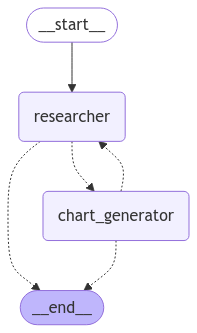 图 2:编译后的图结构
调用图
创建好图后,就可以调用它了!让我们让它为我们绘制一些统计数据:
python
events = graph.stream(
    {
        "messages": [
            (
                "user",
                "First, get the UK's GDP over the past 5 years, then make a line chart of it. "
                "Once you make the chart, finish.",
            )
        ],
    },
    # 图中要执行的最大步骤数
    {"recursion_limit": 150},
)
for s in events:
    print(s)
print("----")执行流程说明
用户请求:"获取英国过去5年的GDP,然后制作折线图"
    |
    v
+---------------------------------------------+
|              researcher 节点                 |
|  1. 接收用户请求                             |
|  2. 使用 Tavily 搜索英国 GDP 数据            |
|  3. 整理搜索结果                             |
|  4. 将结果传递给 chart_generator            |
+---------------------------------------------+
    |
    v
+---------------------------------------------+
|           chart_generator 节点               |
|  1. 接收研究数据                             |
|  2. 使用 Python REPL 生成图表代码            |
|  3. 执行代码生成折线图                       |
|  4. 回复 "FINAL ANSWER" 结束流程            |
+---------------------------------------------+
    |
    v
END(任务完成)核心概念总结
1. 多智能体网络架构
         +----------------+
         |    用户请求    |
         +-------+--------+
                 |
                 v
         +----------------+
         |   Researcher   | <--+
         |   (研究专家)   |    |
         +-------+--------+    |
                 |             | 协作循环
                 v             |
         +----------------+    |
         | Chart Generator| ---+
         |   (图表专家)   |
         +-------+--------+
                 |
                 v
         +----------------+
         |  FINAL ANSWER  |
+----------------+2. Agent 协作要点
| 要点 | 说明 |
|---|---|
| 专业分工 | 每个 Agent 专注于特定任务(研究 vs 图表生成) |
| 消息共享 | Agent 之间通过消息历史共享信息 |
| 动态路由 | 使用 Command 对象动态决定下一个节点 |
| 终止机制 | "FINAL ANSWER" 关键词触发流程结束 |
3. Command 对象使用
python
return Command(
    update={
        "messages": result["messages"],  # 更新状态
    },
    goto=goto,  # 指定下一个节点
)扩展思考
如何添加更多专家 Agent?
- 定义新的 Agent 和对应的节点函数
- 在图中添加新节点和边
- 更新路由逻辑
如何处理 Agent 失败?
- 添加错误处理逻辑
- 实现重试机制
- 设置最大迭代次数
如何优化 Agent 协作?
- 使用更精确的系统提示词
- 实现更智能的路由策略
- 添加中间结果验证
完整案例代码
以下是本案例的完整可运行代码:
python
"""
多智能体网络协作案例
官方来源:https://github.com/langchain-ai/langgraph/blob/main/docs/docs/tutorials/multi_agent/multi-agent-collaboration.ipynb
"""

import getpass
import os
from typing import Annotated, Literal

from langchain_tavily import TavilySearch
from langchain_core.tools import tool
from langchain_core.messages import BaseMessage, HumanMessage
from langchain_experimental.utilities import PythonREPL
from langchain_anthropic import ChatAnthropic
from langgraph.prebuilt import create_react_agent
from langgraph.graph import StateGraph, MessagesState, START, END
from langgraph.types import Command
from IPython.display import Image, display


# ==================== 环境配置 ====================
def _set_if_undefined(var: str):
    if not os.environ.get(var):
        os.environ[var] = getpass.getpass(f"Please provide your {var}")


_set_if_undefined("ANTHROPIC_API_KEY")
_set_if_undefined("TAVILY_API_KEY")


# ==================== 定义工具 ====================
tavily_tool = TavilySearch(max_results=5)

# 警告:这会在本地执行代码,在未沙盒化的情况下可能不安全
repl = PythonREPL()


@tool
def python_repl_tool(
    code: Annotated[str, "The python code to execute to generate your chart."],
):
    """Use this to execute python code. If you want to see the output of a value,
    you should print it out with `print(...)`. This is visible to the user."""
    try:
        result = repl.run(code)
    except BaseException as e:
        return f"Failed to execute. Error: {repr(e)}"
    result_str = f"Successfully executed:\n```python\n{code}\n```\nStdout: {result}"
    return (
        result_str + "\n\nIf you have completed all tasks, respond with FINAL ANSWER."
    )


# ==================== 定义系统提示词 ====================
def make_system_prompt(suffix: str) -> str:
    return (
        "You are a helpful AI assistant, collaborating with other assistants."
        " Use the provided tools to progress towards answering the question."
        " If you are unable to fully answer, that's OK, another assistant with different tools "
        " will help where you left off. Execute what you can to make progress."
        " If you or any of the other assistants have the final answer or deliverable,"
        " prefix your response with FINAL ANSWER so the team knows to stop."
        f"\n{suffix}"
    )


# ==================== 定义 Agent 节点 ====================
llm = ChatAnthropic(model="claude-3-5-sonnet-latest")


def get_next_node(last_message: BaseMessage, goto: str):
    """根据消息内容决定下一个节点"""
    if "FINAL ANSWER" in last_message.content:
        return END
    return goto


# 研究 Agent
research_agent = create_react_agent(
    llm,
    tools=[tavily_tool],
    prompt=make_system_prompt(
        "You can only do research. You are working with a chart generator colleague."
    ),
)


def research_node(
    state: MessagesState,
) -> Command[Literal["chart_generator", END]]:
    """研究节点:执行研究任务,然后路由到图表生成器"""
    result = research_agent.invoke(state)
    goto = get_next_node(result["messages"][-1], "chart_generator")
    result["messages"][-1] = HumanMessage(
        content=result["messages"][-1].content, name="researcher"
    )
    return Command(
        update={"messages": result["messages"]},
        goto=goto,
    )


# 图表生成 Agent
chart_agent = create_react_agent(
    llm,
    [python_repl_tool],
    prompt=make_system_prompt(
        "You can only generate charts. You are working with a researcher colleague."
    ),
)


def chart_node(state: MessagesState) -> Command[Literal["researcher", END]]:
    """图表生成节点:生成图表,然后路由回研究者或结束"""
    result = chart_agent.invoke(state)
    goto = get_next_node(result["messages"][-1], "researcher")
    result["messages"][-1] = HumanMessage(
        content=result["messages"][-1].content, name="chart_generator"
    )
    return Command(
        update={"messages": result["messages"]},
        goto=goto,
    )


# ==================== 构建图 ====================
workflow = StateGraph(MessagesState)
workflow.add_node("researcher", research_node)
workflow.add_node("chart_generator", chart_node)
workflow.add_edge(START, "researcher")

graph = workflow.compile()


# ==================== 可视化图结构 ====================
try:
    display(Image(graph.get_graph().draw_mermaid_png()))
except Exception:
    pass


# ==================== 调用图 ====================
if __name__ == "__main__":
    events = graph.stream(
        {
            "messages": [
                (
                    "user",
                    "First, get the UK's GDP over the past 5 years, then make a line chart of it. "
                    "Once you make the chart, finish.",
                )
            ],
        },
        {"recursion_limit": 150},
    )
    for s in events:
        print(s)
        print("----")