
LangGraph 研究助手案例详细解读
📋 案例概览
这个案例展示了如何使用 LangGraph 构建一个智能研究助手系统,它能够:
- 根据研究主题自动生成多个专业分析师
- 每个分析师对特定子主题进行深度访谈
- 并行执行多个访谈以提高效率
- 最终将所有访谈整合成一份完整的研究报告
📚 术语表
| 术语名称 | LangGraph 定义和解读 | Python 定义和说明 | 重要程度 |
|---|---|---|---|
| Human-in-the-Loop | 在关键决策点人工介入审核和修改的机制 | 通过 interrupt_before 参数实现执行暂停,update_state() 修改状态 | ⭐⭐⭐⭐⭐ |
| Send API | 动态创建并行任务的核心工具,Send(节点名, 状态) | 根据运行时数据为每个分析师创建独立的访谈子图实例 | ⭐⭐⭐⭐⭐ |
| Checkpointer(检查点) | 保存每个节点执行后状态的机制 | from langgraph.checkpoint.memory import MemorySaver,支持中断恢复 | ⭐⭐⭐⭐⭐ |
| interrupt_before | 在指定节点前暂停执行的编译参数 | graph.compile(interrupt_before=['节点名']),实现人工审核点 | ⭐⭐⭐⭐⭐ |
| Pydantic BaseModel | 定义结构化数据模型并支持验证的类 | 确保 LLM 输出格式一致,with_structured_output(Model) 使用 | ⭐⭐⭐⭐⭐ |
| Sub-graph 嵌套 | 将编译后的子图作为节点添加到主图 | builder.add_node("名称", sub_graph.compile()),实现模块化 | ⭐⭐⭐⭐⭐ |
| Map-Reduce 模式 | Map 阶段并行执行访谈,Reduce 阶段汇总报告的架构 | Send 创建多个访谈实例,operator.add 聚合 sections | ⭐⭐⭐⭐⭐ |
| RAG(检索增强生成) | 结合搜索结果(context)生成答案的模式 | search_web + search_wikipedia 提供事实依据,LLM 基于 context 回答 | ⭐⭐⭐⭐⭐ |
| MessagesState | LangGraph 内置状态类,包含 messages 字段管理对话历史 | from langgraph.graph import MessagesState,自动处理消息列表 | ⭐⭐⭐⭐ |
| route_messages | 控制对话循环的路由函数 | 检查轮数和结束信号,决定继续提问或结束访谈 | ⭐⭐⭐⭐ |
| thread_id | 标识会话的唯一 ID,用于 checkpointer 保存和恢复状态 | {"configurable": {"thread_id": "1"}},实现多会话隔离 | ⭐⭐⭐⭐ |
| update_state() | 在中断点修改图状态的方法 | graph.update_state(thread, {字段: 值}, as_node="节点名") | ⭐⭐⭐⭐ |
核心技术点
- 人机协作(Human-in-the-Loop):用户可以审核并修改生成的分析师团队
- 结构化输出:使用 Pydantic 模型确保数据格式一致
- 子图嵌套:访谈流程作为独立子图嵌入主图
- 并行执行(Map-Reduce):使用
Send()API 同时运行多个访谈 - 检查点机制:支持中断和恢复执行流程
🗺️ 整体架构图

**生成的流程图:**

用户输入研究主题
↓
┌─────────────────────────────────────────┐
│ 第一阶段:生成分析师团队 │
├─────────────────────────────────────────┤
│ create_analysts → human_feedback │
│ ↑ ↓ │
│ └────────────────┘ │
│ (可循环修改直到满意) │
└─────────────────────────────────────────┘
↓
┌─────────────────────────────────────────┐
│ 第二阶段:并行执行访谈(Map) │
├─────────────────────────────────────────┤
│ 分析师1 → 访谈子图 → 生成章节 │
│ 分析师2 → 访谈子图 → 生成章节 │
│ 分析师3 → 访谈子图 → 生成章节 │
│ (所有访谈同时进行) │
└─────────────────────────────────────────┘
↓
┌─────────────────────────────────────────┐
│ 第三阶段:汇总报告(Reduce) │
├─────────────────────────────────────────┤
│ write_introduction ┐ │
│ write_report ├→ finalize_report │
│ write_conclusion ┘ │
└─────────────────────────────────────────┘
↓
最终报告📚 代码分段详解
第一部分:定义数据结构
class Analyst(BaseModel):
    affiliation: str  # 所属机构
    name: str         # 姓名
    role: str         # 角色
description: str # 描述作用:这是一个 Pydantic 模型,定义了"分析师"的标准格式。
为什么重要?
- 使用结构化数据模型可以确保 LLM 输出的格式一致
@property装饰器创建了persona属性,将所有信息组合成一个字符串- LangGraph 可以基于这个模型自动验证数据
第二部分:生成分析师(第一个图)
状态定义
class GenerateAnalystsState(TypedDict):
    topic: str                    # 研究主题
    max_analysts: int             # 最大分析师数量
    human_analyst_feedback: str   # 用户反馈
analysts: List[Analyst] # 生成的分析师列表关键概念:状态(State)是 LangGraph 中的核心概念,它像一个"共享内存",在各个节点之间传递数据。
节点函数
1. create_analysts 节点
def create_analysts(state: GenerateAnalystsState):
    # 使用 structured_output 确保 LLM 返回符合 Perspectives 格式的数据
    structured_llm = llm.with_structured_output(Perspectives)

    # 构建系统提示词
    system_message = analyst_instructions.format(
        topic=topic,
        human_analyst_feedback=human_analyst_feedback,
        max_analysts=max_analysts
    )

    # 调用 LLM 生成分析师
    analysts = structured_llm.invoke([SystemMessage(...)])

return {"analysts": analysts.analysts}技术亮点:
with_structured_output()强制 LLM 返回符合Perspectives模型的 JSON- 提示词中包含了主题、用户反馈和数量限制
- 返回的字典会更新状态中的
analysts字段
2. human_feedback 节点
def human_feedback(state: GenerateAnalystsState):
pass # 空操作节点为什么需要空节点?
- 这是一个"中断点"(interrupt point)
- 当执行到这里时,图会暂停,等待用户输入
- 用户可以通过
graph.update_state()修改状态
3. should_continue 条件边
def should_continue(state: GenerateAnalystsState):
    human_analyst_feedback = state.get('human_analyst_feedback', None)

    if human_analyst_feedback:
        return "create_analysts"  # 有反馈,重新生成

return END # 无反馈,结束逻辑说明:
- 检查状态中是否有
human_analyst_feedback - 如果有 → 回到
create_analysts重新生成 - 如果没有 → 结束这个阶段
图的构建
builder = StateGraph(GenerateAnalystsState)
builder.add_node("create_analysts", create_analysts)
builder.add_node("human_feedback", human_feedback)

# 边的连接
builder.add_edge(START, "create_analysts")
builder.add_edge("create_analysts", "human_feedback")
builder.add_conditional_edges("human_feedback", should_continue,
                             ["create_analysts", END])

# 编译图
graph = builder.compile(
    interrupt_before=['human_feedback'],  # 在此节点前中断
    checkpointer=memory                   # 使用内存保存状态
)关键机制:
interrupt_before使图在human_feedback前暂停checkpointer保存执行状态,支持恢复conditional_edges根据函数返回值决定下一步
第三部分:执行访谈(子图)
访谈状态
class InterviewState(MessagesState):
    max_num_turns: int      # 最大对话轮数
    context: Annotated[list, operator.add]  # 检索到的文档
    analyst: Analyst        # 当前分析师
    interview: str          # 访谈记录
sections: list # 生成的章节注意:context: Annotated[list, operator.add]
Annotated指定了如何合并状态operator.add表示新的 context 会追加到现有列表中- 这样多个搜索结果可以累积
核心节点
1. generate_question - 分析师提问
def generate_question(state: InterviewState):
    analyst = state["analyst"]
    messages = state["messages"]

    # 构建系统提示
    system_message = question_instructions.format(goals=analyst.persona)

    # LLM 根据分析师的角色生成问题
    question = llm.invoke([SystemMessage(content=system_message)] + messages)

return {"messages": [question]}工作流程:
- 获取分析师的人设(persona)
- 结合对话历史,生成下一个问题
- 问题会追加到消息列表中
2. search_web 和 search_wikipedia - 并行搜索
def search_web(state: InterviewState):
    # 将对话转换为搜索查询
    structured_llm = llm.with_structured_output(SearchQuery)
    search_query = structured_llm.invoke([search_instructions] + state['messages'])

    # 使用 Tavily 搜索
    search_docs = tavily_search.invoke(search_query.search_query)

    # 格式化结果
    formatted_search_docs = "\n\n---\n\n".join([
        f'<Document href="{doc["url"]}"/>\n{doc["content"]}\n</Document>'
        for doc in search_docs
    ])

return {"context": [formatted_search_docs]}技术细节:
- 先用 LLM 将对话提炼成搜索查询
- 调用外部搜索工具(Tavily/Wikipedia)
- 格式化成带来源标注的文档
- 返回的 context 会自动合并到状态中
3. generate_answer - 专家回答
def generate_answer(state: InterviewState):
    analyst = state["analyst"]
    messages = state["messages"]
    context = state["context"]  # 检索到的所有文档

    # 构建包含上下文的提示
    system_message = answer_instructions.format(
        goals=analyst.persona,
        context=context
    )

    # 生成答案
    answer = llm.invoke([SystemMessage(content=system_message)] + messages)
    answer.name = "expert"  # 标记消息来源

return {"messages": [answer]}RAG 模式:
- 使用检索到的 context 作为知识来源
- LLM 基于这些文档回答问题
- 答案中包含引用标注(如 [1], [2])
4. route_messages - 路由逻辑
def route_messages(state: InterviewState, name: str = "expert"):
    messages = state["messages"]
    max_num_turns = state.get('max_num_turns', 2)

    # 统计专家回答的次数
    num_responses = len([
        m for m in messages
        if isinstance(m, AIMessage) and m.name == name
    ])

    # 达到上限则保存访谈
    if num_responses >= max_num_turns:
        return 'save_interview'

    # 检查是否包含结束语
    last_question = messages[-2]
    if "Thank you so much for your help" in last_question.content:
        return 'save_interview'

return "ask_question" # 继续提问控制逻辑:
- 限制访谈轮数,防止无限循环
- 检测结束信号(感谢语)
- 决定是继续提问还是结束访谈
5. write_section - 生成章节
def write_section(state: InterviewState):
    interview = state["interview"]
    context = state["context"]
    analyst = state["analyst"]

    system_message = section_writer_instructions.format(
        focus=analyst.description
    )

    section = llm.invoke([
        SystemMessage(content=system_message),
        HumanMessage(content=f"Use this source to write your section: {context}")
    ])

return {"sections": [section.content]}报告生成:
- 基于访谈内容和检索文档
- 生成结构化的 Markdown 章节
- 包含摘要和来源引用
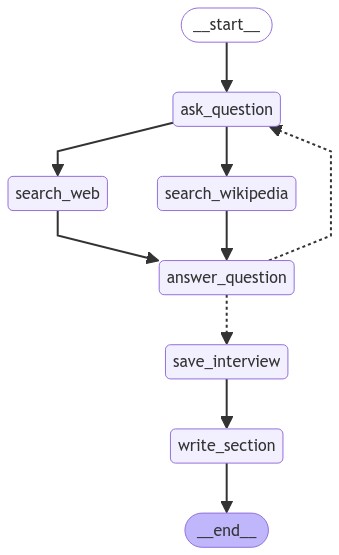
子图构建
interview_builder = StateGraph(InterviewState)

# 添加所有节点
interview_builder.add_node("ask_question", generate_question)
interview_builder.add_node("search_web", search_web)
interview_builder.add_node("search_wikipedia", search_wikipedia)
interview_builder.add_node("answer_question", generate_answer)
interview_builder.add_node("save_interview", save_interview)
interview_builder.add_node("write_section", write_section)

# 关键:并行搜索
interview_builder.add_edge(START, "ask_question")
interview_builder.add_edge("ask_question", "search_web")
interview_builder.add_edge("ask_question", "search_wikipedia")  # 同时触发
interview_builder.add_edge("search_web", "answer_question")
interview_builder.add_edge("search_wikipedia", "answer_question")

# 条件路由
interview_builder.add_conditional_edges("answer_question", route_messages,
                                       ['ask_question', 'save_interview'])

interview_builder.add_edge("save_interview", "write_section")
interview_builder.add_edge("write_section", END)执行流程:
ask_question
    ├─→ search_web ──┐
    └─→ search_wikipedia ──┤
                           ↓
                    answer_question
                           ↓
            ┌──────────────┴──────────────┐
            ↓                              ↓
       ask_question                 save_interview
      (继续循环)                        ↓
                                   write_section
                                        ↓
END第四部分:主图 - Map-Reduce 模式
主状态
class ResearchGraphState(TypedDict):
    topic: str
    max_analysts: int
    human_analyst_feedback: str
    analysts: List[Analyst]
    sections: Annotated[list, operator.add]  # 累积所有章节
    introduction: str
    content: str
    conclusion: str
final_report: strinitiate_all_interviews - Map 步骤
def initiate_all_interviews(state: ResearchGraphState):
    human_analyst_feedback = state.get('human_analyst_feedback')

    if human_analyst_feedback:
        return "create_analysts"  # 返回修改分析师

    # 关键:使用 Send() API 并行启动多个子图
    else:
        topic = state["topic"]
        return [
            Send("conduct_interview", {
                "analyst": analyst,
                "messages": [HumanMessage(
                    content=f"So you said you were writing an article on {topic}?"
                )]
            })
            for analyst in state["analysts"]
]Send() API 的魔力:
- 为每个分析师创建一个独立的访谈子图实例
- 所有访谈并行执行
- 每个子图的
sections输出会自动合并到主状态
类比:
- 就像一个经理同时派遣多个员工去不同地点调研
- 每个员工独立工作,最后汇报结果
- 经理整合所有报告
Reduce 步骤
1. write_report - 整合章节
def write_report(state: ResearchGraphState):
    sections = state["sections"]  # 包含所有分析师的章节
    topic = state["topic"]

    # 将所有章节合并成一个字符串
    formatted_str_sections = "\n\n".join([f"{section}" for section in sections])

    # LLM 整合成连贯的报告主体
    system_message = report_writer_instructions.format(
        topic=topic,
        context=formatted_str_sections
    )

    report = llm.invoke([
        SystemMessage(content=system_message),
        HumanMessage(content="Write a report based upon these memos.")
    ])

return {"content": report.content}2. write_introduction / write_conclusion
def write_introduction(state: ResearchGraphState):
    sections = state["sections"]
    formatted_str_sections = "\n\n".join([f"{section}" for section in sections])

    instructions = intro_conclusion_instructions.format(
        topic=topic,
        formatted_str_sections=formatted_str_sections
    )

    intro = llm.invoke([instructions, HumanMessage(content="Write the report introduction")])

return {"introduction": intro.content}3. finalize_report - 组装最终报告
def finalize_report(state: ResearchGraphState):
    content = state["content"]

    # 清理和分离来源部分
    if content.startswith("## Insights"):
        content = content.strip("## Insights")

    if "## Sources" in content:
        content, sources = content.split("\n## Sources\n")

    # 组装完整报告
    final_report = (
        state["introduction"] + "\n\n---\n\n" +
        content + "\n\n---\n\n" +
        state["conclusion"]
    )

    if sources:
        final_report += "\n\n## Sources\n" + sources

return {"final_report": final_report}主图构建
builder = StateGraph(ResearchGraphState)

# 第一阶段:生成分析师
builder.add_node("create_analysts", create_analysts)
builder.add_node("human_feedback", human_feedback)

# 第二阶段:执行访谈(子图)
builder.add_node("conduct_interview", interview_builder.compile())

# 第三阶段:生成报告
builder.add_node("write_report", write_report)
builder.add_node("write_introduction", write_introduction)
builder.add_node("write_conclusion", write_conclusion)
builder.add_node("finalize_report", finalize_report)

# 流程控制
builder.add_edge(START, "create_analysts")
builder.add_edge("create_analysts", "human_feedback")
builder.add_conditional_edges("human_feedback", initiate_all_interviews,
                             ["create_analysts", "conduct_interview"])

# 关键:并行生成介绍、结论和主体
builder.add_edge("conduct_interview", "write_report")
builder.add_edge("conduct_interview", "write_introduction")
builder.add_edge("conduct_interview", "write_conclusion")

# 汇总
builder.add_edge(["write_conclusion", "write_report", "write_introduction"],
                "finalize_report")
builder.add_edge("finalize_report", END)

# 编译
graph = builder.compile(
    interrupt_before=['human_feedback'],
    checkpointer=memory
)生成的流程图:
🔑 核心技术解析
1. 人机协作(Human-in-the-Loop)
实现方式:
graph = builder.compile(interrupt_before=['human_feedback'], checkpointer=memory)工作流程:
- 图执行到
human_feedback前暂停 - 用户通过
graph.update_state()修改状态 - 继续执行
graph.stream(None, thread)
实际应用:
# 第一次运行
for event in graph.stream(initial_input, thread):
    pass  # 在 human_feedback 前停止

# 用户审核并反馈
graph.update_state(thread, {
    "human_analyst_feedback": "Add a startup CEO"
}, as_node="human_feedback")

# 继续运行
for event in graph.stream(None, thread):
pass # 重新生成分析师2. Send() API - 动态并行
传统方式 vs Send():
传统方式(静态):
builder.add_edge("node_a", "node_b")
builder.add_edge("node_a", "node_c")
# 必须预先知道有多少个节点Send() 方式(动态):
def dynamic_dispatch(state):
    return [
        Send("subgraph", {"input": item})
        for item in state["items"]  # 数量在运行时确定
    ]

builder.add_conditional_edges("dispatcher", dynamic_dispatch)本案例应用:
- 分析师数量由用户输入和 LLM 决定
- 每个分析师对应一个独立的访谈子图实例
- 所有访谈同时运行,大幅提高效率
3. 子图(Subgraph)
为什么使用子图?
- 封装复杂逻辑(访谈流程)
- 可复用(每个分析师复用相同流程)
- 状态隔离(每个访谈有独立的消息历史)
集成方式:
# 子图
interview_graph = interview_builder.compile()

# 嵌入主图
builder.add_node("conduct_interview", interview_graph)生成的流程图:
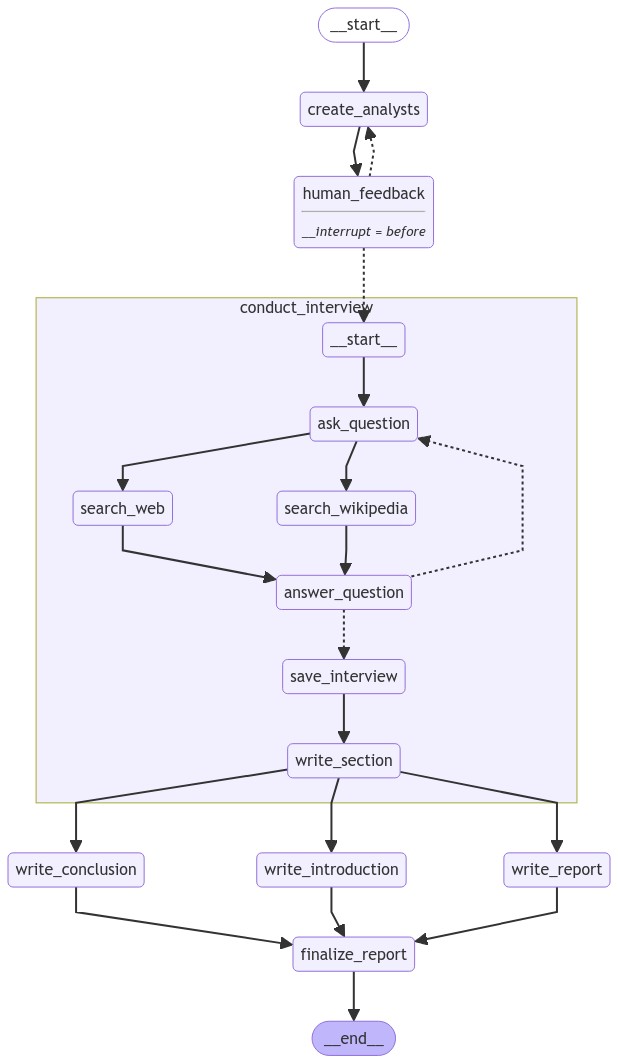
状态传递:
- 主图通过
Send()传递初始状态给子图 - 子图的
sections输出自动合并到主图状态
4. 结构化输出
Pydantic 模型 + with_structured_output():
class Analyst(BaseModel):
    name: str
    role: str
    # ... 其他字段

structured_llm = llm.with_structured_output(Perspectives)
result = structured_llm.invoke(messages) # 自动验证和解析优势:
- 保证数据格式一致
- 自动类型检查
- 易于后续处理
5. 检查点(Checkpointer)
作用:
- 保存每个节点执行后的状态
- 支持中断和恢复
- 实现时间旅行调试
使用方式:
memory = MemorySaver()
graph = builder.compile(checkpointer=memory)

# 使用 thread_id 标识会话
thread = {"configurable": {"thread_id": "1"}}
graph.stream(input, thread)

# 查看当前状态
state = graph.get_state(thread)

# 恢复执行
graph.stream(None, thread)💡 最佳实践和技巧
1. 控制 LLM 输出格式
问题:LLM 输出格式不稳定
解决:
# 定义严格的 Pydantic 模型
class Output(BaseModel):
    field1: str = Field(description="详细描述")
    field2: int

# 强制结构化输出
structured_llm = llm.with_structured_output(Output)
result = structured_llm.invoke(prompt) # 保证符合 Output 格式2. 循环控制
问题:对话可能无限循环
解决:
def route_messages(state):
    max_turns = state.get('max_num_turns', 2)
    current_turns = count_turns(state['messages'])

    if current_turns >= max_turns:
        return 'end_node'

    if detect_end_signal(state['messages']):
        return 'end_node'

return 'continue_node'3. 并行节点的结果合并
使用 Annotated:
from typing import Annotated
import operator

class State(TypedDict):
results: Annotated[list, operator.add] # 自动追加效果:
- 节点 A 返回
{"results": [1, 2]} - 节点 B 返回
{"results": [3, 4]} - 最终状态:
{"results": [1, 2, 3, 4]}
4. 提示词工程
分层提示:
# 系统级指令
system_prompt = """You are an expert. Follow these rules:
1. Rule 1
2. Rule 2
"""

# 角色级指令
role_prompt = f"Your role: {analyst.persona}"

# 任务级指令
task_prompt = "Answer this question: ..."

# 组合
llm.invoke([
    SystemMessage(content=system_prompt),
    SystemMessage(content=role_prompt),
    HumanMessage(content=task_prompt)
])🎯 实战建议
对于初学者
先理解单个节点
- 从
create_analysts开始 - 单独测试每个函数
- 从
逐步构建图
- 先构建最简单的线性图
- 再添加条件边和循环
善用可视化
pythongraph.get_graph().draw_mermaid_png()使用 LangSmith 调试
- 查看每个节点的输入输出
- 追踪 LLM 调用
对于进阶使用
优化并行性
- 识别可以并行的节点
- 使用
Send()动态分发
成本控制
- 使用更小的模型做路由
- 缓存重复的 LLM 调用
错误处理
pythondef safe_node(state): try: return process(state) except Exception as e: return {"error": str(e)}扩展检索源
- 添加更多搜索工具
- 集成本地文档库
📌 总结
这个案例是 LangGraph 的一个综合示范,展示了:
架构设计
- 分层结构:主图 + 子图
- 清晰职责:每个节点只做一件事
- 灵活控制:条件路由 + 循环检测
技术要点
- 结构化输出:确保数据质量
- 人机协作:关键决策点人工介入
- 并行执行:提高系统效率
- 检查点机制:支持中断恢复
应用价值
- 可定制:轻松调整分析师类型、搜索源、报告格式
- 可扩展:添加新的节点和功能
- 生产级:完整的错误处理和状态管理
🚀 后续学习建议
修改案例
- 改变研究主题
- 调整分析师数量和类型
- 使用不同的 LLM 模型
扩展功能
- 添加图表生成
- 集成更多数据源
- 实现多语言支持
优化性能
- 实现结果缓存
- 使用流式输出
- 添加速率限制
深入原理
- 研究 LangGraph 的消息传递机制
- 理解状态更新的原子性
- 学习高级路由策略
🎤 深入理解:Interview 子图在系统中的核心作用
Interview 子图是整个研究助手系统的"心脏",它承担着最关键的知识获取任务。从系统架构的角度看,它扮演着三重角色:
首先,它是知识生产的引擎。通过模拟"分析师-专家"的对话模式,Interview 子图将抽象的研究主题转化为具体的、有深度的知识内容。这种多轮对话机制(ask_question → search → answer → ask_question)实现了渐进式的知识挖掘,每一轮对话都在前一轮的基础上深入,最终形成有价值的研究章节。
其次,它是并行化架构的基本单元。通过 Send() API,系统可以同时启动多个 Interview 实例,每个实例独立运行,互不干扰。这种设计使得 3 个分析师的访谈可以在相同时间内完成,而不是串行执行。子图的状态隔离特性确保了每个分析师都有独立的对话历史和上下文,避免了信息混淆。
最后,它是Map-Reduce 模式的 Map 阶段实现。每个 Interview 子图接收一个分析师作为输入,输出一个结构化的研究章节(section)。这些章节通过 Annotated[list, operator.add] 自动聚合到主图状态中,为后续的 Reduce 阶段(write_report、write_introduction、write_conclusion)提供原材料。这种清晰的输入输出接口使得子图可以无缝集成到更大的系统中。
从技术实现上看,Interview 子图还展示了 LangGraph 的几个重要模式:RAG 检索增强(通过 search_web 和 search_wikipedia 为回答提供事实依据)、循环控制(通过 route_messages 防止无限对话)、消息角色管理(区分 analyst 和 expert 的发言)。这些模式的组合使得 Interview 不仅仅是一个简单的问答流程,而是一个完整的、可控的、高质量的知识生产流水线。
完整案例代码(可直接运行)
以下是一个简化但完整的研究助手示例,展示了核心架构模式:
"""
LangGraph 研究助手完整示例(简化版)
演示:Human-in-the-Loop + Map-Reduce + 子图

场景:智能研究助手
1. 生成分析师团队
2. 人工审核和修改分析师
3. 并行执行多个访谈
4. 汇总生成最终报告
"""

import operator
from typing import Annotated, List, Optional
from typing_extensions import TypedDict
from pydantic import BaseModel, Field
from langgraph.graph import StateGraph, MessagesState, START, END
from langgraph.checkpoint.memory import MemorySaver
from langgraph.types import Send
from langchain_openai import ChatOpenAI
from langchain_core.messages import HumanMessage, AIMessage, SystemMessage

# ========== 1. 数据模型定义 ==========

class Analyst(BaseModel):
    """分析师模型"""
    name: str = Field(description="分析师姓名")
    role: str = Field(description="角色定位")
    description: str = Field(description="专业领域描述")

    @property
    def persona(self) -> str:
        """生成分析师人设"""
        return f"姓名: {self.name}\n角色: {self.role}\n专长: {self.description}"

class Perspectives(BaseModel):
    """分析师团队"""
    analysts: List[Analyst]

class Section(BaseModel):
    """研究章节"""
    title: str
    content: str

# ========== 2. 状态定义 ==========

# 主图状态
class ResearchState(TypedDict):
    topic: str                                       # 研究主题
    max_analysts: int                                # 最大分析师数量
    analysts: List[Analyst]                          # 分析师列表
    human_feedback: Optional[str]                    # 人工反馈
    sections: Annotated[List[str], operator.add]     # 研究章节(支持并行追加)
    final_report: str                                # 最终报告

# 访谈子图状态
class InterviewState(MessagesState):
    analyst: Analyst                                 # 当前分析师
    max_turns: int                                   # 最大对话轮数
    section: str                                     # 生成的章节

# ========== 3. 初始化 ==========

llm = ChatOpenAI(model="gpt-4o-mini", temperature=0.7)
memory = MemorySaver()

# ========== 4. 提示词 ==========

analyst_prompt = """你是一个研究团队组建专家。请根据以下研究主题,生成 {max_analysts} 位不同视角的分析师。

研究主题: {topic}

{feedback_section}

要求:
- 每位分析师应该有独特的专业背景
- 分析师之间的视角应该互补
- 名字应该符合专业领域特点

请生成分析师团队。"""

interview_prompt = """你是一位专家,正在接受 {analyst_name}({analyst_role})的采访。

你的任务是根据分析师的问题,提供专业、详细的回答。

分析师背景:
{analyst_description}

对话历史会自动提供,请根据最新问题回答。"""

question_prompt = """你是 {analyst_name},一位 {analyst_role}。

你的专长:{analyst_description}

你正在采访一位专家,研究主题是相关领域。请根据对话历史提出下一个有深度的问题。

如果你认为已经获得了足够的信息(通常是 2-3 轮对话后),请在问题末尾加上"非常感谢您的分享!"来结束采访。"""

section_prompt = """请根据以下采访记录,生成一个简洁的研究章节。

分析师: {analyst_name} ({analyst_role})
采访记录:
{interview_content}

要求:
- 标题应该反映核心发现
- 内容简洁,突出关键洞察
- 100-200 字"""

report_prompt = """请将以下研究章节整合成一份完整的研究报告。

研究主题: {topic}

章节内容:
{sections}

要求:
- 添加引言和结论
- 保持各章节的核心观点
- 整体逻辑连贯"""

# ========== 5. 节点函数 - 主图 ==========

def create_analysts(state: ResearchState):
    """生成分析师团队"""
    topic = state["topic"]
    max_analysts = state.get("max_analysts", 3)
    feedback = state.get("human_feedback", "")

    feedback_section = ""
    if feedback:
        feedback_section = f"\n用户反馈: {feedback}\n请根据反馈调整分析师团队。"

    prompt = analyst_prompt.format(
        topic=topic,
        max_analysts=max_analysts,
        feedback_section=feedback_section
    )

    response = llm.with_structured_output(Perspectives).invoke(prompt)

    print(f"📋 生成了 {len(response.analysts)} 位分析师:")
    for a in response.analysts:
        print(f"  - {a.name}: {a.role}")

    return {"analysts": response.analysts, "human_feedback": None}

def human_review(state: ResearchState):
    """人工审核节点(空节点,用于中断)"""
    pass

def should_continue(state: ResearchState):
    """判断是否需要重新生成分析师"""
    if state.get("human_feedback"):
        return "create_analysts"
    return "conduct_interviews"

def initiate_interviews(state: ResearchState):
    """分发访谈任务"""
    analysts = state["analysts"]
    topic = state["topic"]

    # 使用 Send 为每个分析师创建访谈任务
    sends = [
        Send("interview", {
            "analyst": analyst,
            "max_turns": 2,
            "messages": [HumanMessage(content=f"我们来聊聊关于 {topic} 的话题。")]
        })
        for analyst in analysts
    ]

    print(f"📤 分发 {len(sends)} 个访谈任务")
    return sends

def generate_report(state: ResearchState):
    """生成最终报告"""
    topic = state["topic"]
    sections = state["sections"]

    sections_text = "\n\n---\n\n".join(sections)

    prompt = report_prompt.format(topic=topic, sections=sections_text)
    response = llm.invoke(prompt)

    print("📝 最终报告生成完成")
    return {"final_report": response.content}

# ========== 6. 节点函数 - 访谈子图 ==========

def ask_question(state: InterviewState):
    """分析师提问"""
    analyst = state["analyst"]
    messages = state["messages"]

    prompt = question_prompt.format(
        analyst_name=analyst.name,
        analyst_role=analyst.role,
        analyst_description=analyst.description
    )

    response = llm.invoke([SystemMessage(content=prompt)] + messages)

    print(f"❓ {analyst.name} 提问")
    return {"messages": [response]}

def answer_question(state: InterviewState):
    """专家回答"""
    analyst = state["analyst"]
    messages = state["messages"]

    prompt = interview_prompt.format(
        analyst_name=analyst.name,
        analyst_role=analyst.role,
        analyst_description=analyst.description
    )

    response = llm.invoke([SystemMessage(content=prompt)] + messages)
    response.name = "expert"

    print(f"💡 专家回答 {analyst.name} 的问题")
    return {"messages": [response]}

def should_continue_interview(state: InterviewState):
    """判断是否继续访谈"""
    messages = state["messages"]
    max_turns = state.get("max_turns", 2)

    # 统计专家回答次数
    expert_responses = len([m for m in messages if isinstance(m, AIMessage) and getattr(m, 'name', None) == 'expert'])

    # 检查是否达到轮数上限
    if expert_responses >= max_turns:
        return "write_section"

    # 检查是否有结束信号
    last_message = messages[-1] if messages else None
    if last_message and "非常感谢" in str(last_message.content):
        return "write_section"

    return "answer_question"

def write_section(state: InterviewState):
    """生成研究章节"""
    analyst = state["analyst"]
    messages = state["messages"]

    # 格式化对话历史
    interview_content = "\n".join([
        f"{'分析师' if isinstance(m, HumanMessage) or (isinstance(m, AIMessage) and getattr(m, 'name', None) != 'expert') else '专家'}: {m.content[:200]}..."
        if len(str(m.content)) > 200 else
        f"{'分析师' if isinstance(m, HumanMessage) or (isinstance(m, AIMessage) and getattr(m, 'name', None) != 'expert') else '专家'}: {m.content}"
        for m in messages
    ])

    prompt = section_prompt.format(
        analyst_name=analyst.name,
        analyst_role=analyst.role,
        interview_content=interview_content
    )

    response = llm.with_structured_output(Section).invoke(prompt)

    section_text = f"## {response.title}\n\n{response.content}"
    print(f"📄 {analyst.name} 的章节生成完成")

    return {"sections": [section_text]}

# ========== 7. 构建访谈子图 ==========

def build_interview_graph():
    """构建访谈子图"""
    builder = StateGraph(InterviewState)

    builder.add_node("ask_question", ask_question)
    builder.add_node("answer_question", answer_question)
    builder.add_node("write_section", write_section)

    builder.add_edge(START, "ask_question")
    builder.add_conditional_edges(
        "ask_question",
        should_continue_interview,
        ["answer_question", "write_section"]
    )
    builder.add_edge("answer_question", "ask_question")
    builder.add_edge("write_section", END)

    return builder.compile()

# ========== 8. 构建主图 ==========

def build_research_graph():
    """构建研究助手主图"""
    # 编译访谈子图
    interview_graph = build_interview_graph()

    # 构建主图
    builder = StateGraph(ResearchState)

    builder.add_node("create_analysts", create_analysts)
    builder.add_node("human_review", human_review)
    builder.add_node("interview", interview_graph)
    builder.add_node("generate_report", generate_report)

    # 流程
    builder.add_edge(START, "create_analysts")
    builder.add_edge("create_analysts", "human_review")
    builder.add_conditional_edges(
        "human_review",
        should_continue,
        ["create_analysts", "conduct_interviews"]
    )

    # 使用 Send 分发访谈任务
    def dispatch_interviews(state):
        return initiate_interviews(state)

    builder.add_conditional_edges(
        "human_review",
        lambda state: "conduct_interviews" if not state.get("human_feedback") else "create_analysts",
        {
            "conduct_interviews": "interview",
            "create_analysts": "create_analysts"
        }
    )

    # 修正:直接添加条件边进行分发
    builder.add_conditional_edges(
        "human_review",
        initiate_interviews,
        ["interview"]
    )

    builder.add_edge("interview", "generate_report")
    builder.add_edge("generate_report", END)

    return builder.compile(
        interrupt_before=["human_review"],
        checkpointer=memory
    )

# ========== 9. 简化版主图(不使用 Human-in-the-Loop)==========

def build_simple_research_graph():
    """构建简化版研究助手(无人工审核)"""
    interview_graph = build_interview_graph()

    builder = StateGraph(ResearchState)

    builder.add_node("create_analysts", create_analysts)
    builder.add_node("interview", interview_graph)
    builder.add_node("generate_report", generate_report)

    builder.add_edge(START, "create_analysts")
    builder.add_conditional_edges(
        "create_analysts",
        initiate_interviews,
        ["interview"]
    )
    builder.add_edge("interview", "generate_report")
    builder.add_edge("generate_report", END)

    return builder.compile()

# ========== 10. 主程序 ==========

if __name__ == "__main__":
    # 使用简化版(无人工审核)
    graph = build_simple_research_graph()

    # 可视化
    print("=" * 60)
    print("📊 图结构可视化")
    print("=" * 60)

    try:
        from IPython.display import Image, display
        display(Image(graph.get_graph(xray=1).draw_mermaid_png()))
    except Exception:
        print(graph.get_graph().draw_mermaid())

    # 执行研究
    print("\n" + "=" * 60)
    print("🚀 执行研究助手")
    print("=" * 60 + "\n")

    topic = "人工智能在教育领域的应用"

    print(f"📚 研究主题: {topic}\n")
    print("⏳ 执行中...\n")

    # 使用 stream 观察执行过程
    for step in graph.stream({
        "topic": topic,
        "max_analysts": 2  # 简化为2位分析师
    }):
        for node_name, output in step.items():
            if node_name == "interview":
                pass  # 访谈节点会有多个输出
            else:
                print(f"📌 节点 [{node_name}] 完成\n")

    # 获取最终结果
    result = graph.invoke({
        "topic": topic,
        "max_analysts": 2
    })

    # 显示结果
    print("\n" + "=" * 60)
    print("📋 研究报告")
    print("=" * 60)

    print(f"\n📚 主题: {result['topic']}")
    print(f"\n👥 分析师团队:")
    for a in result['analysts']:
        print(f"  - {a.name}: {a.role}")

    print(f"\n📄 研究章节 ({len(result['sections'])} 个):")
    for i, section in enumerate(result['sections']):
        print(f"\n--- 章节 {i+1} ---")
        print(section[:300] + "..." if len(section) > 300 else section)

    print(f"\n📝 最终报告:\n")
print(result['final_report'][:1000] + "..." if len(result['final_report']) > 1000 else result['final_report'])运行结果示例
============================================================
📊 图结构可视化
============================================================
(图结构展示)

============================================================
🚀 执行研究助手
============================================================

📚 研究主题: 人工智能在教育领域的应用

⏳ 执行中...

📋 生成了 2 位分析师:
  - 张教授: 教育技术专家
  - 李研究员: AI算法研究员
📤 分发 2 个访谈任务
📌 节点 [create_analysts] 完成

❓ 张教授 提问
💡 专家回答 张教授 的问题
❓ 张教授 提问
💡 专家回答 张教授 的问题
📄 张教授 的章节生成完成
❓ 李研究员 提问
💡 专家回答 李研究员 的问题
❓ 李研究员 提问
💡 专家回答 李研究员 的问题
📄 李研究员 的章节生成完成

📝 最终报告生成完成
📌 节点 [generate_report] 完成

============================================================
📋 研究报告
============================================================

📚 主题: 人工智能在教育领域的应用

👥 分析师团队:
  - 张教授: 教育技术专家
  - 李研究员: AI算法研究员

📄 研究章节 (2 个):

--- 章节 1 ---
## 个性化学习的革新

AI技术正在重塑教育模式,通过学习分析和自适应算法,
系统能够为每位学生提供定制化的学习路径...

--- 章节 2 ---
## 智能评估与反馈系统

AI驱动的评估系统能够实现即时、多维度的学习评价,
不仅提高效率,还能发现传统方法难以捕捉的学习模式...

📝 最终报告:

# 人工智能在教育领域的应用研究报告

## 引言

人工智能技术正在深刻改变教育领域的面貌...

## 个性化学习的革新
...

## 智能评估与反馈系统
...

## 结论

AI在教育中的应用前景广阔,但需要平衡技术与人文关怀...核心知识点回顾
| 概念 | 说明 | 代码示例 |
|---|---|---|
| Human-in-the-Loop | 人工审核介入 | interrupt_before=["human_review"] |
| Send API | 动态并行分发 | [Send("interview", {...}) for a in analysts] |
| 子图嵌套 | 复杂逻辑封装 | add_node("interview", interview_graph) |
| MessagesState | 对话状态管理 | class InterviewState(MessagesState) |
| Checkpointer | 状态持久化 | MemorySaver() |
| Pydantic | 结构化输出 | llm.with_structured_output(Model) |
| 条件路由 | 动态流程控制 | add_conditional_edges(...) |
| Reducer | 并行结果合并 | Annotated[List[str], operator.add] |
最后的话:LangGraph 的强大之处在于它让你像搭积木一样构建复杂的 AI 系统。这个研究助手案例虽然复杂,但每个组件都很简单。掌握了这些基础构建块,你就可以创造出无限可能的应用!