
12.6 从零构建深度研究系统
本节将带你从零开始构建一个完整的多智能体深度研究系统(Deep Research System)。这个系统能够:
- 理解用户意图 - 通过澄清对话收集必要的研究背景信息
- 生成研究简报 - 将用户对话转化为详细的研究任务描述
- 并行研究 - 使用多个研究代理同时探索不同子主题
- 综合报告 - 将所有研究结果整合成最终报告
系统架构概览
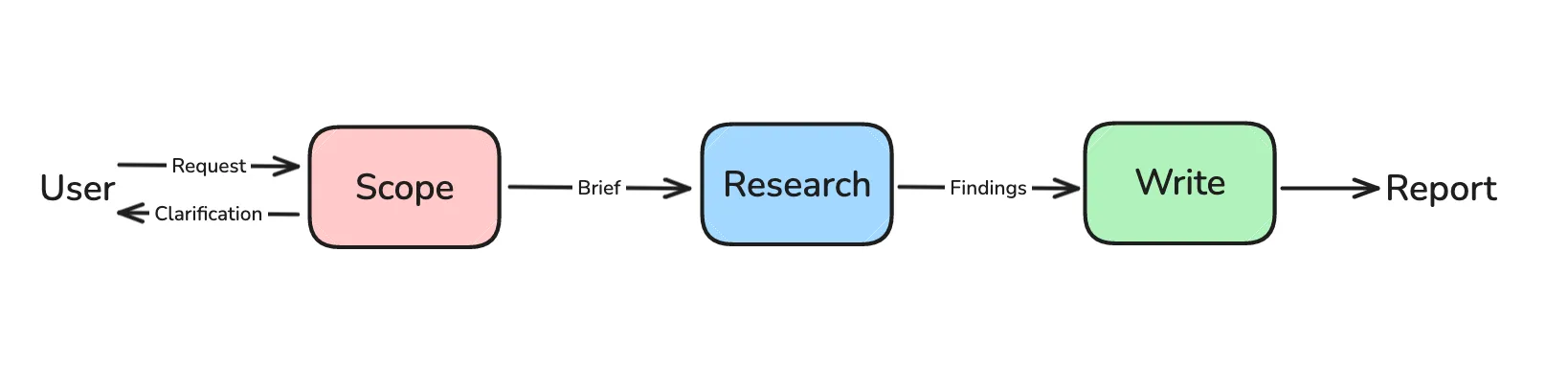
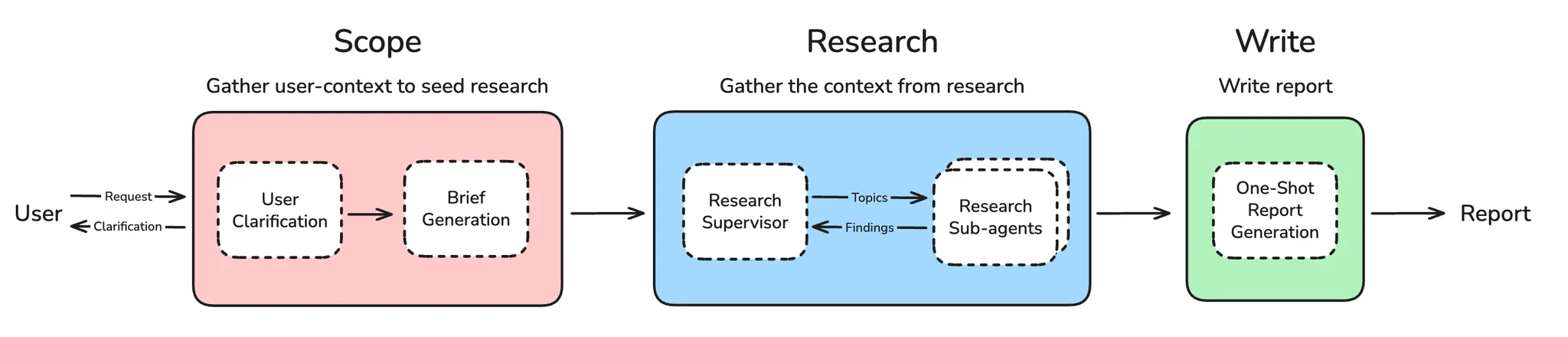
整个深度研究系统的工作流程如下:
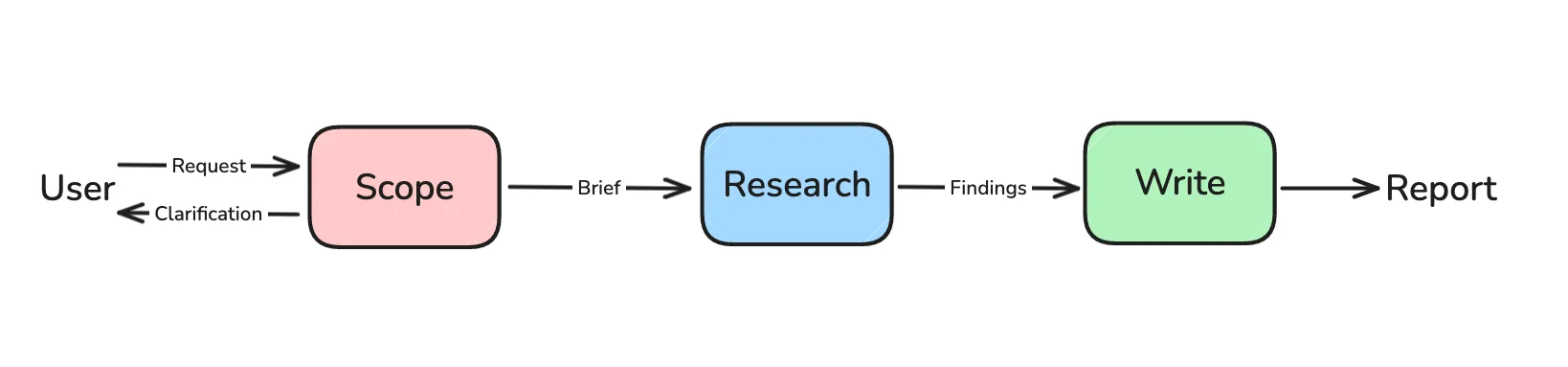
系统分为四个主要阶段:
- 范围界定(Scoping) - 收集用户上下文,生成研究简报
- 研究执行(Research) - 使用工具收集信息
- 多智能体协调(Supervisor) - 协调多个研究代理
- 报告生成(Report) - 综合所有发现,生成最终报告
第一部分:用户澄清与研究简报生成
1.1 为什么需要范围界定?
用户的初始请求往往缺少重要细节,例如:
- 范围和边界:应该包含或排除什么?
- 受众和目的:这个研究是为谁做的?为什么?
- 具体要求:有特定的来源、时间范围或约束吗?
- 术语澄清:领域特定术语或缩写是什么意思?
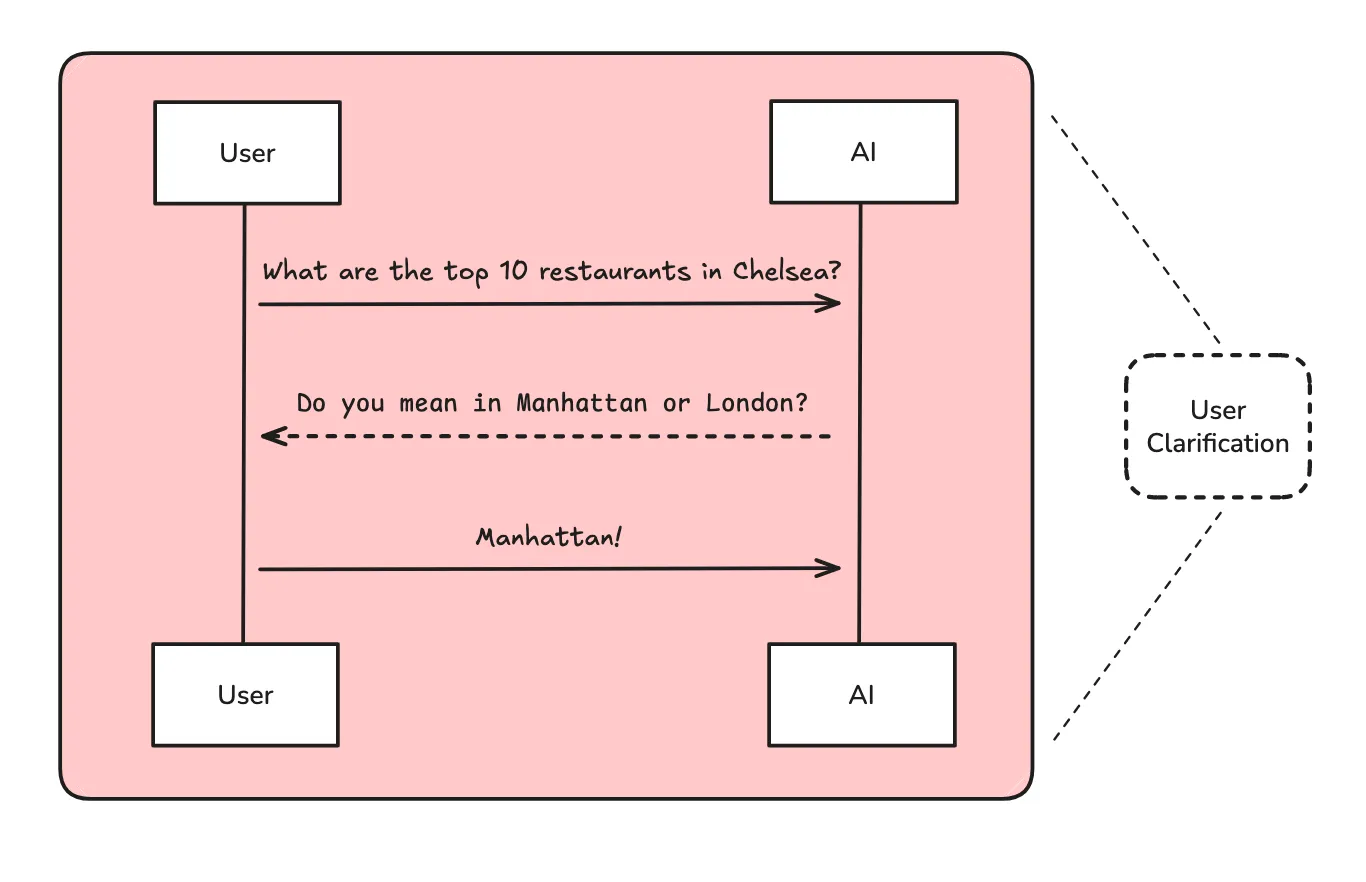
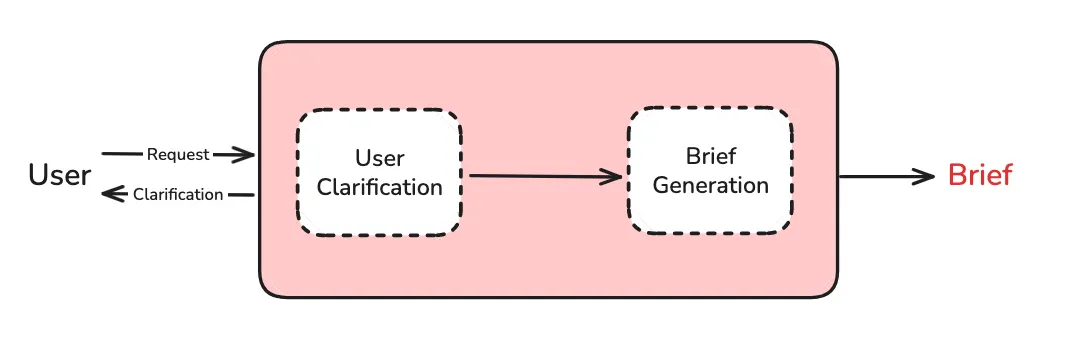
范围界定分为两个步骤:
- 用户澄清 - 确定是否需要向用户询问更多信息
- 简报生成 - 将对话转化为详细的研究简报
1.2 状态定义
首先,我们定义状态对象和结构化输出模式:
python
"""状态定义和 Pydantic 模式"""

import operator
from typing_extensions import Optional, Annotated, List, Sequence

from langchain_core.messages import BaseMessage
from langgraph.graph import MessagesState
from langgraph.graph.message import add_messages
from pydantic import BaseModel, Field

# ===== 状态定义 =====

class AgentInputState(MessagesState):
    """完整代理的输入状态 - 只包含用户输入的消息"""
    pass

class AgentState(MessagesState):
    """
    完整多智能体研究系统的主状态。
    扩展 MessagesState,添加研究协调所需的额外字段。
    """
    # 从用户对话历史生成的研究简报
    research_brief: Optional[str]
    # 与监督代理交换的消息
    supervisor_messages: Annotated[Sequence[BaseMessage], add_messages]
    # 研究阶段收集的原始笔记
    raw_notes: Annotated[list[str], operator.add] = []
    # 处理后准备用于报告生成的笔记
    notes: Annotated[list[str], operator.add] = []
    # 最终格式化的研究报告
    final_report: str

# ===== 结构化输出模式 =====

class ClarifyWithUser(BaseModel):
    """用户澄清决策和问题的模式"""
    need_clarification: bool = Field(
        description="是否需要向用户询问澄清问题",
    )
    question: str = Field(
        description="向用户询问的澄清问题",
    )
    verification: str = Field(
        description="确认将开始研究的验证消息",
    )

class ResearchQuestion(BaseModel):
    """研究简报生成的模式"""
    research_brief: str = Field(
        description="用于指导研究的研究问题",
)1.3 范围界定工作流
python
"""用户澄清和研究简报生成"""

from datetime import datetime
from typing_extensions import Literal

from langchain.chat_models import init_chat_model
from langchain_core.messages import HumanMessage, AIMessage, get_buffer_string
from langgraph.graph import StateGraph, START, END
from langgraph.types import Command

def get_today_str() -> str:
    """获取当前日期的可读格式"""
    return datetime.now().strftime("%a %b %-d, %Y")

# 初始化模型
model = init_chat_model(model="openai:gpt-4.1", temperature=0.0)

def clarify_with_user(state: AgentState) -> Command[Literal["write_research_brief", "__end__"]]:
    """
    确定用户请求是否包含足够的信息来进行研究。
    使用结构化输出进行确定性决策。
    """
    structured_output_model = model.with_structured_output(ClarifyWithUser)

    response = structured_output_model.invoke([
        HumanMessage(content=clarify_with_user_instructions.format(
            messages=get_buffer_string(messages=state["messages"]),
            date=get_today_str()
        ))
    ])

    # 根据澄清需求进行路由
    if response.need_clarification:
        return Command(
            goto=END,
            update={"messages": [AIMessage(content=response.question)]}
        )
    else:
        return Command(
            goto="write_research_brief",
            update={"messages": [AIMessage(content=response.verification)]}
        )

def write_research_brief(state: AgentState):
    """将对话历史转化为全面的研究简报。"""
    structured_output_model = model.with_structured_output(ResearchQuestion)

    response = structured_output_model.invoke([
        HumanMessage(content=transform_messages_into_research_topic_prompt.format(
            messages=get_buffer_string(state.get("messages", [])),
            date=get_today_str()
        ))
    ])

    return {
        "research_brief": response.research_brief,
        "supervisor_messages": [HumanMessage(content=f"{response.research_brief}.")]
    }

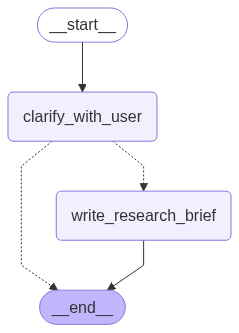
# 构建范围界定工作流
deep_researcher_builder = StateGraph(AgentState, input_schema=AgentInputState)
deep_researcher_builder.add_node("clarify_with_user", clarify_with_user)
deep_researcher_builder.add_node("write_research_brief", write_research_brief)
deep_researcher_builder.add_edge(START, "clarify_with_user")
deep_researcher_builder.add_edge("write_research_brief", END)

scope_research = deep_researcher_builder.compile()1.4 范围界定图结构
第二部分:研究代理
2.1 研究代理概述
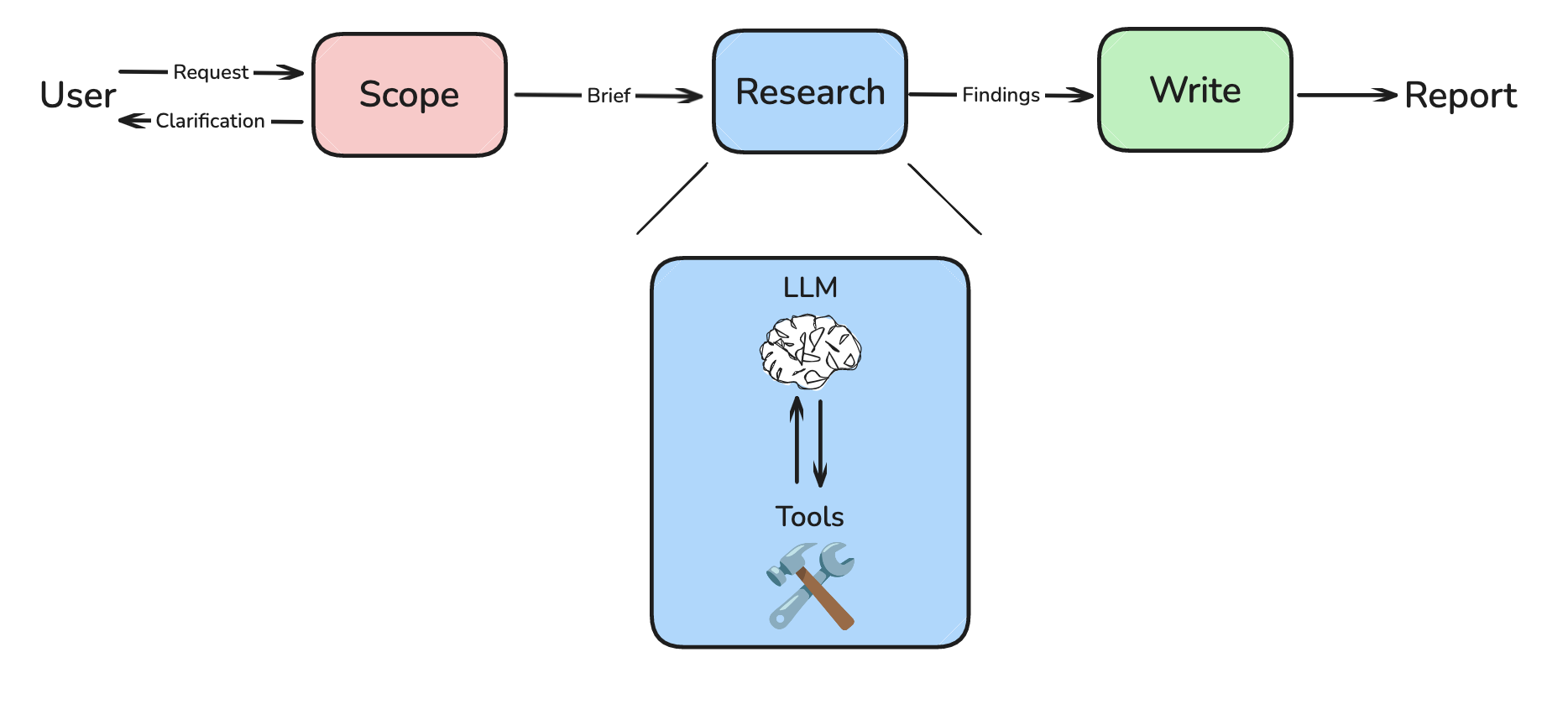
研究是一个开放式任务,最佳策略无法提前确定。不同的请求需要不同的研究策略和搜索深度。
代理遵循一个简单而有效的模式:
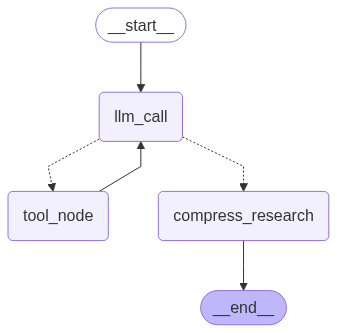
- LLM 决策节点 - 分析当前状态,决定是调用工具还是提供最终响应
- 工具执行节点 - 当 LLM 确定需要更多信息时执行搜索工具
- 研究压缩节点 - 总结和压缩研究发现,提高处理效率
- 路由逻辑 - 根据 LLM 决策确定工作流继续方向
2.2 提示词设计原则
1. 像代理一样思考
- 仔细阅读问题 - 用户需要什么具体信息?
- 从更广泛的搜索开始 - 首先使用广泛、全面的查询
- 每次搜索后暂停评估 - 我有足够的信息回答吗?还缺什么?
- 随着信息收集执行更窄的搜索 - 填补空白
2. 具体启发式规则(防止"旋转"问题)
使用硬性限制防止研究代理过度调用工具:
- 能自信回答时停止 - 不要为了完美继续搜索
- 给它预算 - 简单查询使用 2-3 次搜索工具调用,复杂查询最多 5 次
- 限制 - 如果找不到正确来源,5 次搜索后始终停止
3. 展示思考过程
每次搜索工具调用后,使用 think_tool 分析结果:
- 我找到了什么关键信息?
- 还缺什么?
- 我有足够的信息全面回答问题吗?
- 应该继续搜索还是提供答案?
2.3 搜索工具实现
我们使用 Tavily SDK 进行网络搜索:
python
"""研究工具和实用程序"""

from datetime import datetime
from typing_extensions import Annotated, Literal

from langchain_core.tools import tool, InjectedToolArg
from tavily import TavilyClient

tavily_client = TavilyClient()

@tool(parse_docstring=True)
def tavily_search(
    query: str,
    max_results: Annotated[int, InjectedToolArg] = 3,
    topic: Annotated[Literal["general", "news", "finance"], InjectedToolArg] = "general",
) -> str:
    """使用 Tavily 搜索 API 获取结果。

    Args:
        query: 要执行的搜索查询
        max_results: 返回的最大结果数
        topic: 结果过滤主题

    Returns:
        格式化的搜索结果字符串
    """
    search_results = tavily_client.search(
        query,
        max_results=max_results,
        include_raw_content=True,
        topic=topic
    )

    formatted_output = "Search results:\n\n"
    for i, result in enumerate(search_results['results'], 1):
        formatted_output += f"--- SOURCE {i}: {result['title']} ---\n"
        formatted_output += f"URL: {result['url']}\n"
        formatted_output += f"CONTENT:\n{result['content']}\n\n"

    return formatted_output

@tool(parse_docstring=True)
def think_tool(reflection: str) -> str:
    """用于研究进展和决策的战略反思工具。

    Args:
        reflection: 关于研究进展、发现和下一步的详细反思

    Returns:
        确认反思已记录
    """
return f"Reflection recorded: {reflection}"2.4 研究代理实现
python
"""研究代理实现"""

from typing_extensions import Literal
from langgraph.graph import StateGraph, START, END
from langchain_core.messages import SystemMessage, ToolMessage, filter_messages
from langchain.chat_models import init_chat_model

# 设置工具和模型
tools = [tavily_search, think_tool]
tools_by_name = {tool.name: tool for tool in tools}

model = init_chat_model(model="anthropic:claude-sonnet-4-20250514")
model_with_tools = model.bind_tools(tools)
compress_model = init_chat_model(model="openai:gpt-4.1", max_tokens=32000)

def llm_call(state: ResearcherState):
    """分析当前状态并决定下一步操作"""
    return {
        "researcher_messages": [
            model_with_tools.invoke(
                [SystemMessage(content=research_agent_prompt)] + state["researcher_messages"]
            )
        ]
    }

def tool_node(state: ResearcherState):
    """执行所有工具调用"""
    tool_calls = state["researcher_messages"][-1].tool_calls

    observations = []
    for tool_call in tool_calls:
        tool = tools_by_name[tool_call["name"]]
        observations.append(tool.invoke(tool_call["args"]))

    tool_outputs = [
        ToolMessage(content=obs, name=tc["name"], tool_call_id=tc["id"])
        for obs, tc in zip(observations, tool_calls)
    ]

    return {"researcher_messages": tool_outputs}

def compress_research(state: ResearcherState) -> dict:
    """将研究发现压缩为简洁摘要"""
    system_message = compress_research_system_prompt.format(date=get_today_str())
    messages = [SystemMessage(content=system_message)] + state.get("researcher_messages", [])
    response = compress_model.invoke(messages)

    raw_notes = [
        str(m.content) for m in filter_messages(
            state["researcher_messages"], include_types=["tool", "ai"]
        )
    ]

    return {
        "compressed_research": str(response.content),
        "raw_notes": ["\n".join(raw_notes)]
    }

def should_continue(state: ResearcherState) -> Literal["tool_node", "compress_research"]:
    """确定是继续研究还是提供最终答案"""
    last_message = state["researcher_messages"][-1]
    if last_message.tool_calls:
        return "tool_node"
    return "compress_research"

# 构建代理工作流
agent_builder = StateGraph(ResearcherState, output_schema=ResearcherOutputState)
agent_builder.add_node("llm_call", llm_call)
agent_builder.add_node("tool_node", tool_node)
agent_builder.add_node("compress_research", compress_research)
agent_builder.add_edge(START, "llm_call")
agent_builder.add_conditional_edges("llm_call", should_continue)
agent_builder.add_edge("tool_node", "llm_call")
agent_builder.add_edge("compress_research", END)

researcher_agent = agent_builder.compile()2.5 研究代理图结构
第三部分:MCP 集成的研究代理
3.1 Model Context Protocol (MCP) 简介
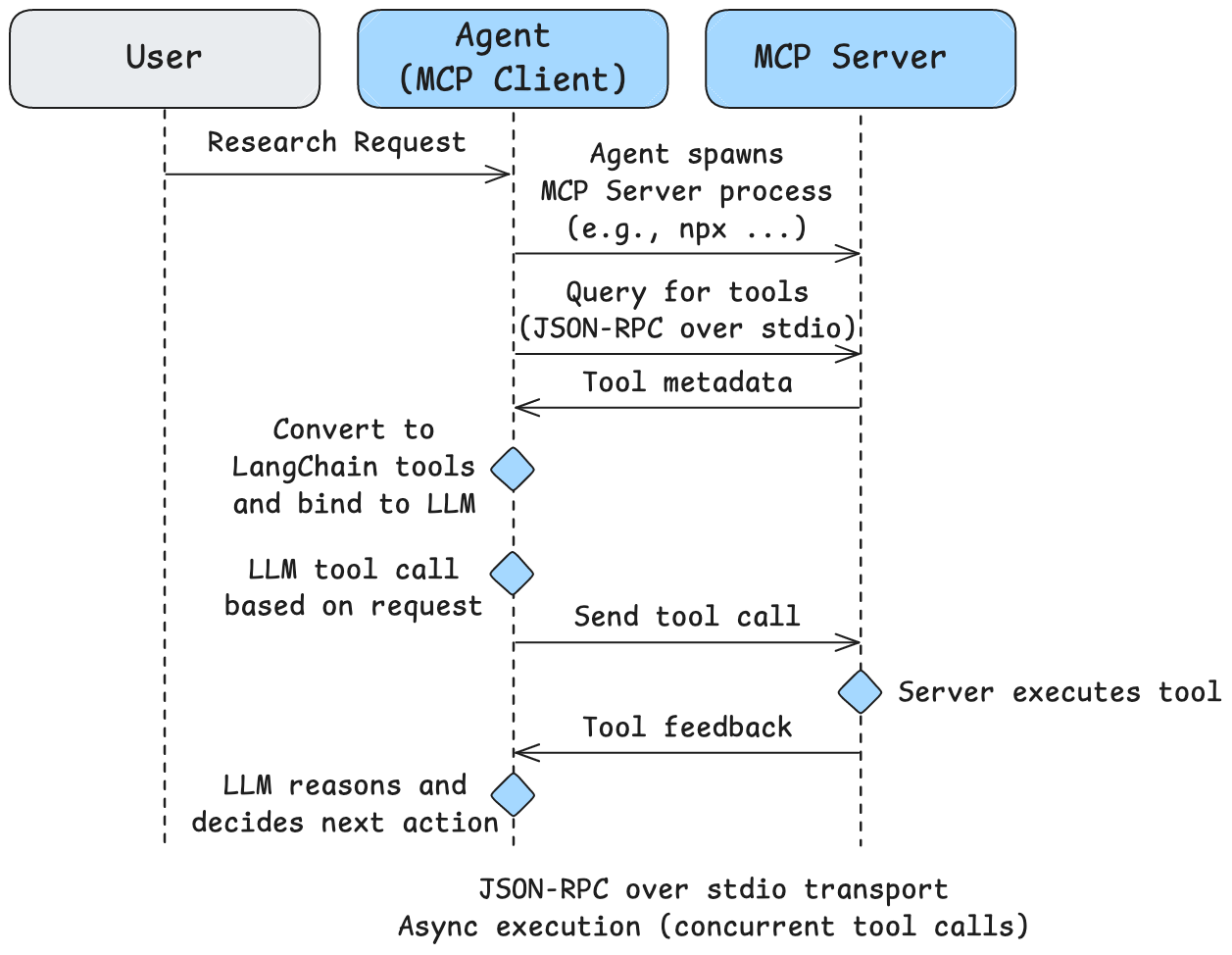
除了自定义工具,我们还可以使用 Model Context Protocol (MCP) 访问工具。MCP 服务器提供标准化协议来访问工具。

Filesystem MCP 服务器 提供对本地文件系统的安全受控访问:
- 文件操作:
read_file,write_file,read_multiple_files - 目录管理:
create_directory,list_directory,move_file - 搜索发现:
search_files,get_file_info
3.2 MCP 客户端配置
python
import os
from langchain_mcp_adapters.client import MultiServerMCPClient

sample_docs_path = os.path.abspath("./files/")

mcp_config = {
    "filesystem": {
        "command": "npx",
        "args": ["-y", "@modelcontextprotocol/server-filesystem", sample_docs_path],
        "transport": "stdio"
    }
}

client = MultiServerMCPClient(mcp_config)
tools = await client.get_tools()3.3 MCP 代理图结构
3.4 两种传输类型
- stdio 传输(本地服务器):使用标准输入/输出进行通信
- HTTP 传输(远程服务器):使用 HTTP 请求进行通信
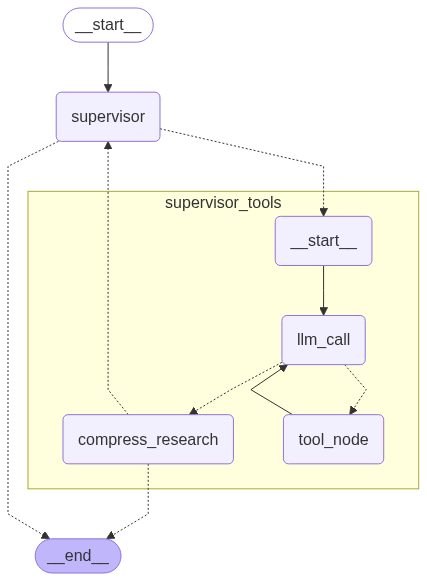
第四部分:多智能体监督器
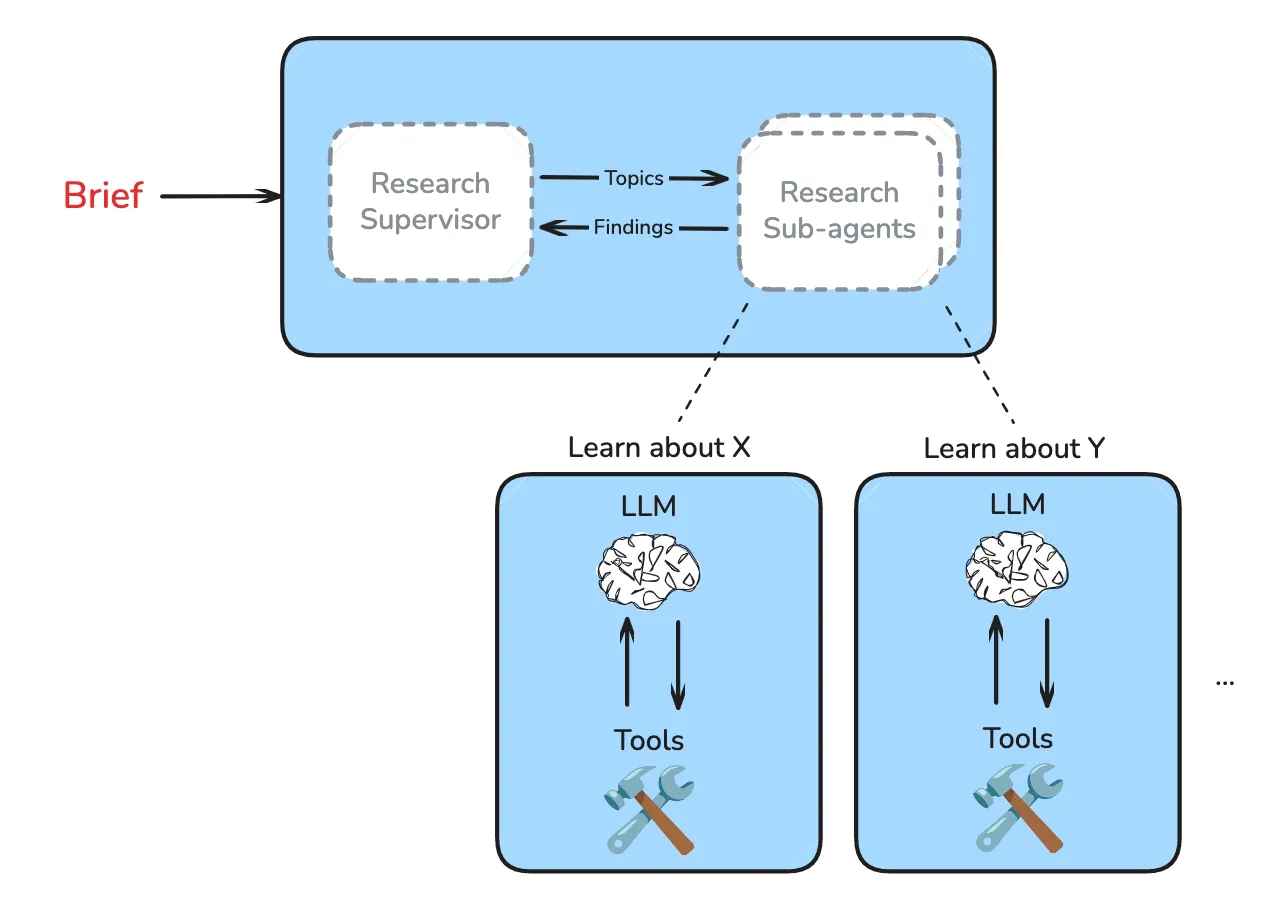
4.1 为什么需要多智能体?
当请求复杂且有多个子主题时,单个代理的响应质量可能会下降。多智能体系统可以将子主题分配给具有隔离上下文窗口的子代理。
4.2 监督器设计原则
扩展规则
- 简单的事实查找、列表和排名可以使用单个子代理
- 比较任务可以为每个元素使用一个子代理
示例:
- 列出旧金山排名前 10 的咖啡店 -> 使用 1 个子代理
- 比较 OpenAI vs. Anthropic vs. DeepMind -> 使用 3 个子代理
4.3 监督器状态定义
python
"""多智能体研究监督器的状态定义"""

import operator
from typing_extensions import Annotated, TypedDict, Sequence
from langchain_core.messages import BaseMessage
from langchain_core.tools import tool
from langgraph.graph.message import add_messages
from pydantic import BaseModel, Field

class SupervisorState(TypedDict):
    """多智能体研究监督器的状态"""
    supervisor_messages: Annotated[Sequence[BaseMessage], add_messages]
    research_brief: str
    notes: Annotated[list[str], operator.add] = []
    research_iterations: int = 0
    raw_notes: Annotated[list[str], operator.add] = []

@tool
class ConductResearch(BaseModel):
    """将研究任务委派给专门子代理的工具"""
    research_topic: str = Field(description="要研究的主题")

@tool
class ResearchComplete(BaseModel):
    """标记研究完成的工具"""
pass4.4 监督器图结构
第五部分:完整多智能体研究系统
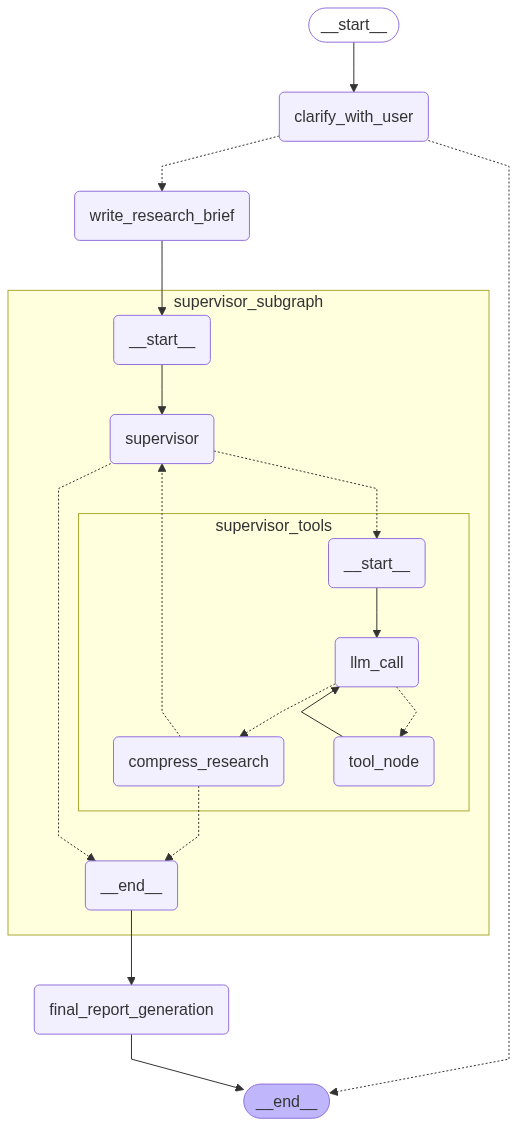
5.1 系统整合
5.2 完整系统实现
python
"""完整多智能体研究系统"""

from langchain_core.messages import HumanMessage
from langgraph.graph import StateGraph, START, END
from langchain.chat_models import init_chat_model

writer_model = init_chat_model(model="openai:gpt-4.1", max_tokens=32000)

async def final_report_generation(state: AgentState):
    """最终报告生成节点"""
    notes = state.get("notes", [])
    findings = "\n".join(notes)

    final_report_prompt = final_report_generation_prompt.format(
        research_brief=state.get("research_brief", ""),
        findings=findings,
        date=get_today_str()
    )

    final_report = await writer_model.ainvoke([HumanMessage(content=final_report_prompt)])

    return {
        "final_report": final_report.content,
        "messages": ["Here is the final report: " + final_report.content],
    }

# 构建完整工作流
deep_researcher_builder = StateGraph(AgentState, input_schema=AgentInputState)

deep_researcher_builder.add_node("clarify_with_user", clarify_with_user)
deep_researcher_builder.add_node("write_research_brief", write_research_brief)
deep_researcher_builder.add_node("supervisor_subgraph", supervisor_agent)
deep_researcher_builder.add_node("final_report_generation", final_report_generation)

deep_researcher_builder.add_edge(START, "clarify_with_user")
deep_researcher_builder.add_edge("write_research_brief", "supervisor_subgraph")
deep_researcher_builder.add_edge("supervisor_subgraph", "final_report_generation")
deep_researcher_builder.add_edge("final_report_generation", END)

agent = deep_researcher_builder.compile()5.3 完整系统图结构
5.4 递归限制说明
LangGraph 默认递归限制为 25 步。对于复杂研究工作流,需要增加此限制:
python
thread = {"configurable": {"thread_id": "1", "recursion_limit": 50}}第六部分:评估
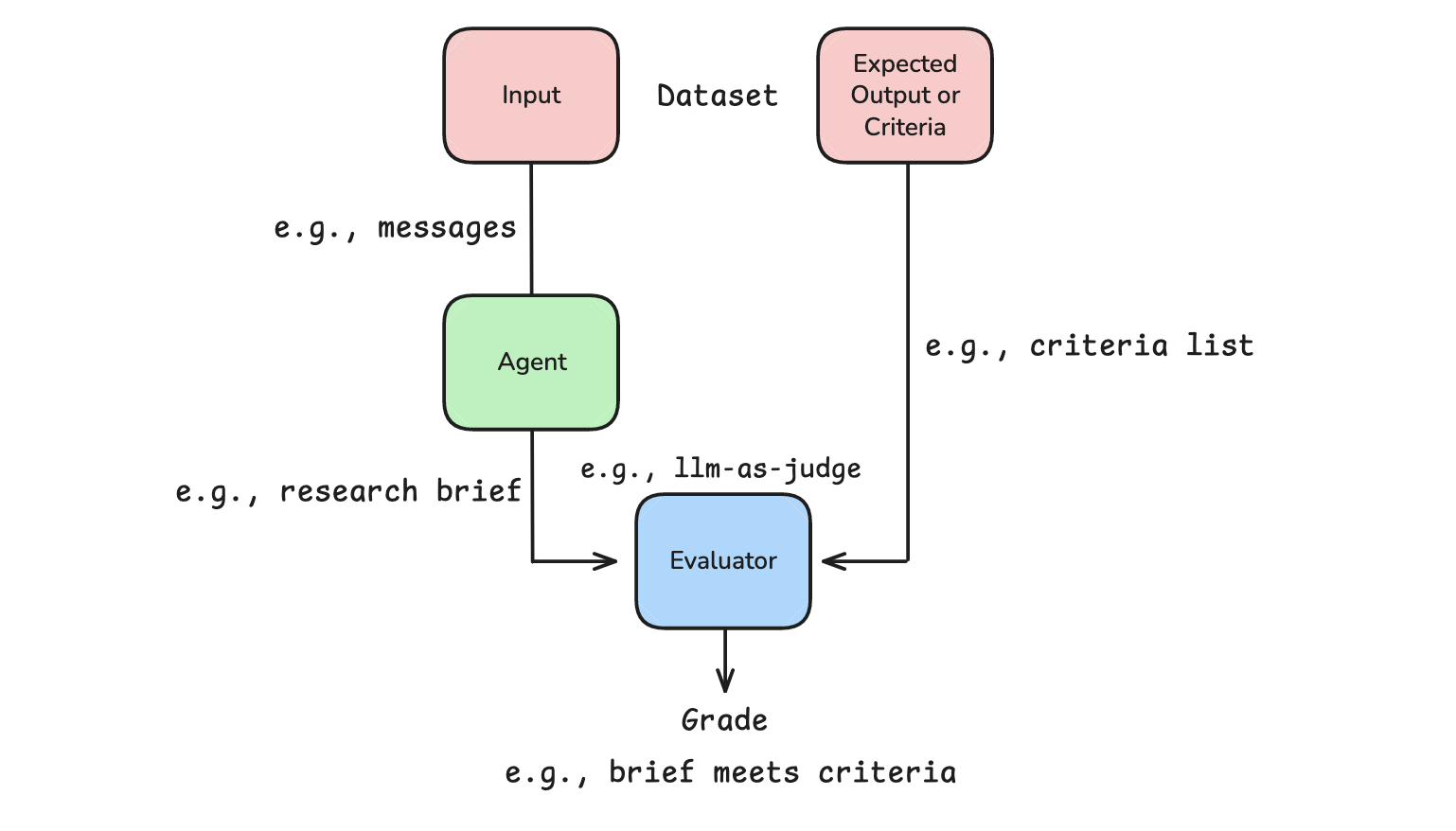
6.1 研究代理评估
评估代理工具调用循环的关键问题:
- 过早终止: 代理在任务未完成时决定停止调用工具
- 过度循环: 代理对信息状态永不满意
python
def evaluate_next_step(outputs: dict, reference_outputs: dict):
    tool_calls = outputs["researcher_messages"][-1].tool_calls
    made_tool_call = len(tool_calls) > 0
    return {
        "key": "correct_next_step",
        "score": made_tool_call == (reference_outputs["next_step"] == "continue")
}6.2 监督器并行化评估
python
def evaluate_parallelism(outputs: dict, reference_outputs: dict):
    tool_calls = outputs["output"].update["supervisor_messages"][-1].tool_calls
    return {
        "key": "correct_next_step",
        "score": len(tool_calls) == reference_outputs["num_expected_threads"]
    }
总结
本节从零开始构建了一个完整的多智能体深度研究系统,涵盖了:
- 范围界定 - 通过澄清对话收集用户上下文,生成详细研究简报
- 研究代理 - 使用工具进行迭代搜索,应用上下文工程压缩发现
- MCP 集成 - 使用 Model Context Protocol 访问本地文件系统工具
- 多智能体监督 - 协调多个并行研究代理,隔离上下文窗口
- 最终报告生成 - 综合所有研究发现,生成结构化报告
关键设计原则:
- 像人类研究员一样思考 - 给代理清晰的指示和启发式规则
- 使用硬性限制 - 防止过度工具调用的"旋转"问题
- 展示思考过程 - 使用 think_tool 进行战略反思
- 上下文工程 - 压缩研究发现,管理上下文窗口
- 并行化决策 - 监督器根据任务类型决定是否启动多个子代理