
Command:LangGraph 的"无边图"神器
在构建复杂的 AI Agent 时,你是否遇到过这些问题?
- 需要在节点中同时更新状态并且控制下一步去哪个节点
- 想实现多智能体之间的"切换"(handoff),让一个 Agent 把控制权交给另一个
- 图的边太多太复杂,维护困难
- 条件边的路由逻辑和状态更新逻辑重复
Command 就是为解决这些问题而生的。
什么是 Command?
Command 是 LangGraph 中的一个特殊类型,它允许你在同一个操作中完成两件事:
- 更新状态(update):修改图的共享状态
- 控制流程(goto):指定下一步执行哪个节点
传统上,LangGraph 中的节点和边是分离的:
节点(Node):负责执行逻辑,返回状态更新
边(Edge):负责决定下一步去哪里而 Command 打破了这个界限,让节点可以直接决定下一步去哪里。
为什么需要 Command?
传统方式的问题
假设你要实现一个多智能体系统,Agent A 根据任务类型决定把工作交给 Agent B 或 Agent C:
传统方式:需要定义条件边
# 定义节点
def agent_a(state: State):
    # 分析任务类型
    task_type = analyze_task(state["input"])
    return {"task_type": task_type}

# 定义路由函数
def route_after_a(state: State):
    if state["task_type"] == "research":
        return "agent_b"
    elif state["task_type"] == "coding":
        return "agent_c"
    return END

# 构建图
graph.add_node("agent_a", agent_a)
graph.add_node("agent_b", agent_b)
graph.add_node("agent_c", agent_c)

# 添加条件边
graph.add_conditional_edges("agent_a", route_after_a)这种方式有几个问题:
- 逻辑分散:任务分析在节点中,路由决策在边函数中
- 重复计算:如果路由需要复杂的 LLM 调用,可能需要重复执行
- 状态冗余:需要在状态中保存中间结果供路由函数使用
Command 方式:简洁优雅
from langgraph.types import Command
from typing import Literal

def agent_a(state: State) -> Command[Literal["agent_b", "agent_c"]]:
    # 分析任务类型
    task_type = analyze_task(state["input"])

    # 直接在节点中决定下一步
    if task_type == "research":
        return Command(
            update={"task_type": task_type},
            goto="agent_b"
        )
    else:
        return Command(
            update={"task_type": task_type},
            goto="agent_c"
        )

# 构建图 - 不需要条件边!
graph.add_node("agent_a", agent_a)
graph.add_node("agent_b", agent_b)
graph.add_node("agent_c", agent_c)
graph.add_edge(START, "agent_a")Command 的基本语法
基础用法
from langgraph.types import Command
from typing import Literal

def my_node(state: State) -> Command[Literal["next_node"]]:
    return Command(
        update={"foo": "bar"},  # 状态更新
        goto="next_node"        # 下一个节点
)关键要素
| 参数 | 说明 | 示例 |
|---|---|---|
update | 要应用到状态的更新 | {"messages": [response]} |
goto | 下一个要执行的节点名 | "agent_b" 或 ["agent_b", "agent_c"] |
graph | 可选,指定目标图 | Command.PARENT |
resume | 可选,恢复中断时的输入 | "用户输入的内容" |
类型注解的重要性
必须在函数签名中声明可能的目标节点:
# 正确:声明所有可能的目标节点
def my_node(state: State) -> Command[Literal["node_a", "node_b", "node_c"]]:
    ...

# 错误:缺少类型注解
def my_node(state: State):  # 这会导致图渲染和验证问题
return Command(goto="node_a")这个类型注解让 LangGraph 知道这个节点可能跳转到哪些目标,用于:
- 图的可视化:正确渲染节点之间的连接
- 编译时验证:确保目标节点存在
- 类型安全:IDE 可以提供自动补全
动态路由
Command 最强大的能力是动态路由——根据运行时的条件决定下一步:
def smart_router(state: State) -> Command[Literal["researcher", "coder", "writer"]]:
    # 使用 LLM 分析任务
    analysis = llm.invoke(f"分析这个任务需要什么技能:{state['task']}")

    if "研究" in analysis.content:
        return Command(
            update={"analysis": analysis.content},
            goto="researcher"
        )
    elif "代码" in analysis.content:
        return Command(
            update={"analysis": analysis.content},
            goto="coder"
        )
    else:
        return Command(
            update={"analysis": analysis.content},
            goto="writer"
)多智能体切换(Handoffs)
Command 在多智能体系统中的核心应用是切换(Handoff)——让一个智能体把控制权交给另一个。
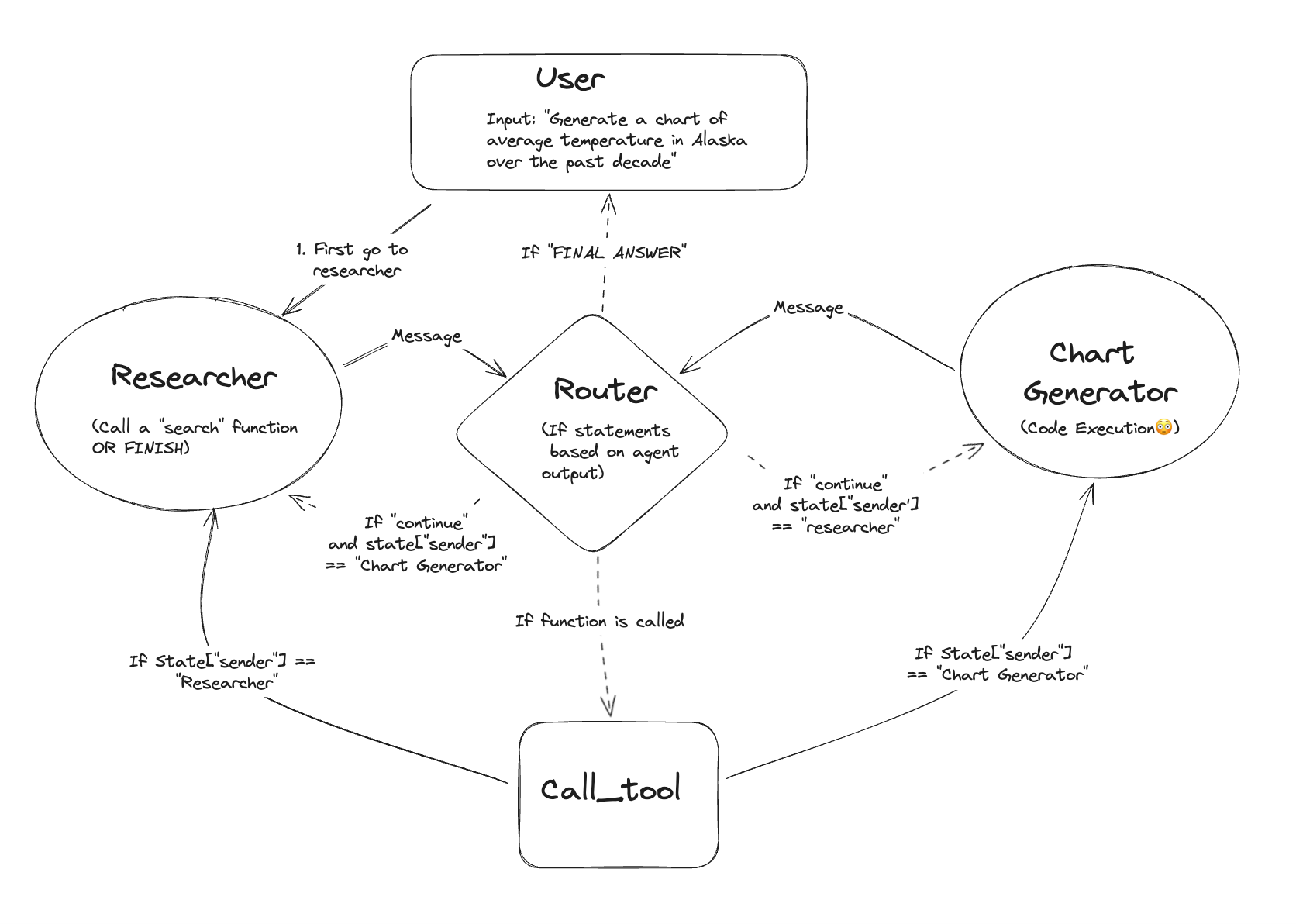 图:多智能体协作架构
什么是 Handoff?
Handoff 是多智能体交互中的常见模式:
- 源 Agent 完成自己的任务
- 判断下一步应该由哪个 Agent 处理
- 传递必要的信息给目标 Agent
- 转移控制权
Handoff 的两个核心要素
| 要素 | 说明 | Command 对应 |
|---|---|---|
| 目标(Destination) | 要跳转到的 Agent | goto 参数 |
| 负载(Payload) | 要传递的信息 | update 参数 |
实现示例
from langgraph.types import Command
from typing import Literal
from langchain_core.messages import AIMessage

class AgentState(TypedDict):
    messages: Annotated[list, add_messages]
    current_agent: str
    context: dict

def research_agent(state: AgentState) -> Command[Literal["coding_agent", "writing_agent", END]]:
    """研究 Agent:收集信息后决定下一步"""

    # 执行研究任务
    research_result = llm.invoke([
        SystemMessage("你是一个研究助手,收集并分析信息"),
        *state["messages"]
    ])

    # 分析研究结果,决定下一步
    if "需要写代码" in research_result.content:
        return Command(
            update={
                "messages": [research_result],
                "current_agent": "coding_agent",
                "context": {"research_findings": research_result.content}
            },
            goto="coding_agent"
        )
    elif "需要撰写报告" in research_result.content:
        return Command(
            update={
                "messages": [research_result],
                "current_agent": "writing_agent"
            },
            goto="writing_agent"
        )
    else:
        # 研究完成,直接结束
        return Command(
            update={"messages": [research_result]},
            goto=END
)Supervisor 模式与 Command
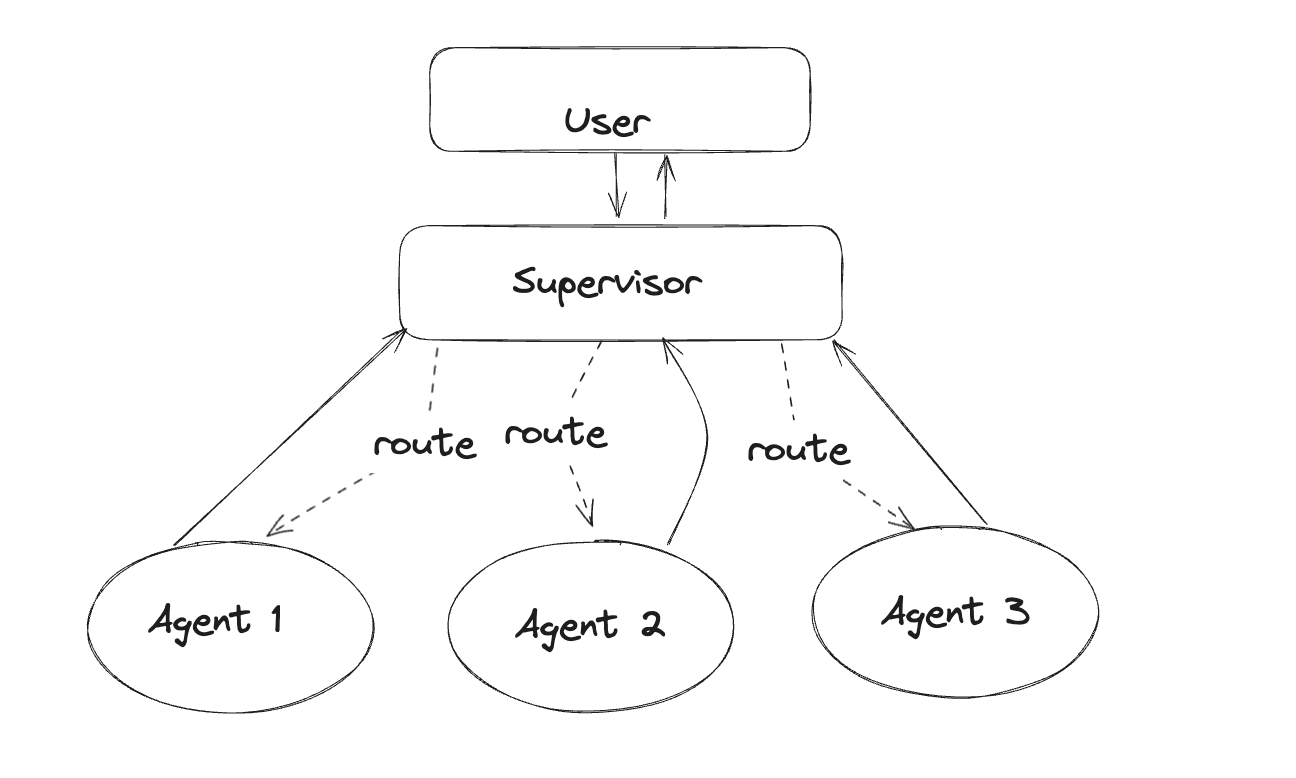 图:Supervisor 模式架构
在 Supervisor(主管)模式中,一个中央 Agent 负责调度和协调其他 Worker Agent。Command 让这种模式的实现变得非常简洁:
from langgraph.types import Command
from typing import Literal
from pydantic import BaseModel

class RouterDecision(BaseModel):
    """Supervisor 的路由决策"""
    next_agent: Literal["researcher", "coder", "writer", "FINISH"]
    reason: str

def supervisor(state: State) -> Command[Literal["researcher", "coder", "writer", END]]:
    """Supervisor Agent:决定下一步由谁执行"""

    # 使用结构化输出获取决策
    decision = llm.with_structured_output(RouterDecision).invoke([
        SystemMessage("""你是一个团队主管,根据当前任务状态决定下一步:
        - researcher:需要收集信息
        - coder:需要编写代码
        - writer:需要撰写文档
        - FINISH:任务完成"""),
        *state["messages"]
    ])

    if decision.next_agent == "FINISH":
        return Command(
            update={"decision_reason": decision.reason},
            goto=END
        )

    return Command(
        update={
            "current_worker": decision.next_agent,
            "decision_reason": decision.reason
        },
        goto=decision.next_agent
    )

def researcher(state: State) -> Command[Literal["supervisor"]]:
    """研究员完成任务后返回 Supervisor"""
    result = do_research(state)
    return Command(
        update={"messages": [AIMessage(content=result)]},
        goto="supervisor"
    )

def coder(state: State) -> Command[Literal["supervisor"]]:
    """程序员完成任务后返回 Supervisor"""
    result = write_code(state)
    return Command(
        update={"messages": [AIMessage(content=result)]},
        goto="supervisor"
    )

def writer(state: State) -> Command[Literal["supervisor"]]:
    """写手完成任务后返回 Supervisor"""
    result = write_document(state)
    return Command(
        update={"messages": [AIMessage(content=result)]},
        goto="supervisor"
    )

# 构建图
graph = StateGraph(State)
graph.add_node("supervisor", supervisor)
graph.add_node("researcher", researcher)
graph.add_node("coder", coder)
graph.add_node("writer", writer)

graph.add_edge(START, "supervisor")
# 注意:不需要添加其他边!Command 会处理路由分层多智能体系统
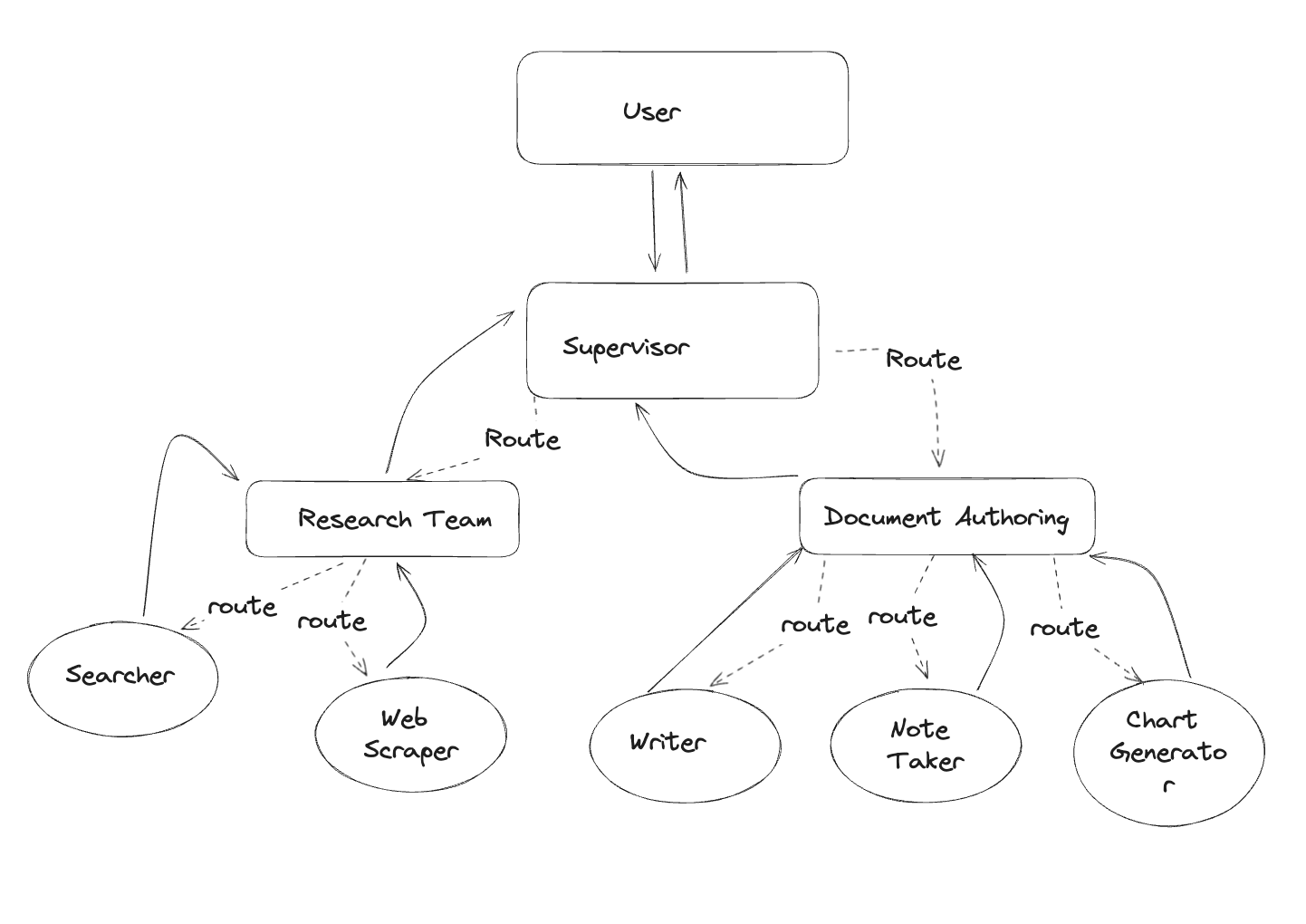 图:分层多智能体架构
在更复杂的系统中,你可能有多层 Agent。Command 支持跨层级跳转:
从子图跳转到父图
使用 graph=Command.PARENT 可以从子图跳转到父图中的节点:
def subgraph_agent(state: State) -> Command[Literal["other_subgraph"]]:
    """子图中的 Agent 可以跳转到父图的其他子图"""
    return Command(
        update={"result": "任务完成"},
        goto="other_subgraph",
        graph=Command.PARENT  # 指定跳转到父图
)这在分层系统中非常有用,例如:
父图
├── 子图 A(研究团队)
│   ├── Agent A1
│   └── Agent A2
├── 子图 B(开发团队)
│   ├── Agent B1
│   └── Agent B2
└── 子图 C(测试团队)
    ├── Agent C1
└── Agent C2研究团队完成后,可以直接跳转到开发团队,而不需要先返回父图再路由。
Human-in-the-Loop 与 Command
Command 在人工介入工作流中扮演重要角色。当使用 interrupt() 暂停执行后,使用 Command(resume=...) 恢复:
from langgraph.types import Command, interrupt

def review_node(state: State):
    """需要人工审核的节点"""
    # 暂停执行,等待人工输入
    human_feedback = interrupt({
        "question": "请审核以下内容是否正确",
        "content": state["draft"]
    })

    # 人工反馈会通过 Command(resume=...) 传入
    return {"feedback": human_feedback, "reviewed": True}

# 使用时,恢复执行
graph.invoke(
    Command(resume="已审核,内容正确"),
    config={"configurable": {"thread_id": "xxx"}}
)Command vs 条件边:何时使用哪个?
| 场景 | 推荐方案 | 原因 |
|---|---|---|
| 同时需要更新状态和路由 | Command | 避免逻辑分散和重复计算 |
| 多智能体切换 | Command | 自然表达 handoff 语义 |
| 纯路由,无状态更新 | 条件边 | 更简洁,图结构清晰 |
| 多个节点共享相同路由逻辑 | 条件边 | 复用路由函数 |
| 需要跨子图跳转 | Command | 支持 graph=Command.PARENT |
完整示例:多智能体客服系统
下面是一个综合示例,展示如何使用 Command 构建一个多智能体客服系统:
from typing import Annotated, Literal
from typing_extensions import TypedDict
from langgraph.graph import StateGraph, START, END
from langgraph.graph.message import add_messages
from langgraph.types import Command, interrupt
from langchain_openai import ChatOpenAI
from langchain_core.messages import SystemMessage, AIMessage, HumanMessage
from pydantic import BaseModel

# 定义状态
class CustomerServiceState(TypedDict):
    messages: Annotated[list, add_messages]
    customer_issue: str
    issue_category: str | None
    resolution: str | None

# 定义路由决策模型
class IssueClassification(BaseModel):
    category: Literal["billing", "technical", "general"]
    urgency: Literal["low", "medium", "high"]
    reason: str

# 初始化 LLM
llm = ChatOpenAI(model="gpt-4o", temperature=0)

# 路由 Agent
def router_agent(state: CustomerServiceState) -> Command[Literal["billing_agent", "technical_agent", "general_agent"]]:
    """分析客户问题,路由到正确的专业 Agent"""

    classifier = llm.with_structured_output(IssueClassification)

    classification = classifier.invoke([
        SystemMessage("分析客户问题,确定类别和紧急程度"),
        HumanMessage(state["customer_issue"])
    ])

    agent_map = {
        "billing": "billing_agent",
        "technical": "technical_agent",
        "general": "general_agent"
    }

    return Command(
        update={
            "issue_category": classification.category,
            "messages": [AIMessage(content=f"问题分类:{classification.category},原因:{classification.reason}")]
        },
        goto=agent_map[classification.category]
    )

# 账单 Agent
def billing_agent(state: CustomerServiceState) -> Command[Literal["human_review", END]]:
    """处理账单相关问题"""

    response = llm.invoke([
        SystemMessage("你是账单专家,处理客户的账单问题"),
        *state["messages"],
        HumanMessage(state["customer_issue"])
    ])

    # 涉及退款需要人工审核
    if "退款" in response.content or "refund" in response.content.lower():
        return Command(
            update={"messages": [response], "resolution": response.content},
            goto="human_review"
        )

    return Command(
        update={"messages": [response], "resolution": response.content},
        goto=END
    )

# 技术支持 Agent
def technical_agent(state: CustomerServiceState) -> Command[Literal[END]]:
    """处理技术问题"""

    response = llm.invoke([
        SystemMessage("你是技术支持专家,帮助客户解决技术问题"),
        *state["messages"],
        HumanMessage(state["customer_issue"])
    ])

    return Command(
        update={"messages": [response], "resolution": response.content},
        goto=END
    )

# 通用 Agent
def general_agent(state: CustomerServiceState) -> Command[Literal[END]]:
    """处理一般性咨询"""

    response = llm.invoke([
        SystemMessage("你是客服代表,处理一般性咨询"),
        *state["messages"],
        HumanMessage(state["customer_issue"])
    ])

    return Command(
        update={"messages": [response], "resolution": response.content},
        goto=END
    )

# 人工审核节点
def human_review(state: CustomerServiceState) -> Command[Literal[END]]:
    """需要人工审核的情况"""

    # 暂停等待人工输入
    approval = interrupt({
        "question": "请审核以下退款请求",
        "resolution": state["resolution"],
        "customer_issue": state["customer_issue"]
    })

    if approval == "approved":
        final_response = f"您的请求已批准。{state['resolution']}"
    else:
        final_response = "抱歉,您的请求需要进一步处理,我们会尽快联系您。"

    return Command(
        update={
            "messages": [AIMessage(content=final_response)],
            "resolution": final_response
        },
        goto=END
    )

# 构建图
def build_customer_service_graph():
    graph = StateGraph(CustomerServiceState)

    # 添加节点
    graph.add_node("router", router_agent)
    graph.add_node("billing_agent", billing_agent)
    graph.add_node("technical_agent", technical_agent)
    graph.add_node("general_agent", general_agent)
    graph.add_node("human_review", human_review)

    # 只需要添加入口边
    graph.add_edge(START, "router")
    # 其他路由由 Command 处理,不需要显式添加边!

    return graph.compile()

# 使用
app = build_customer_service_graph()

result = app.invoke({
    "customer_issue": "我上个月的账单多收了 50 块钱,我要求退款",
    "messages": []
})

print(result["resolution"])可视化你的 Command 图
使用 LangGraph 的可视化功能查看你的图结构:
from IPython.display import Image, display

# 获取图的可视化
display(Image(app.get_graph().draw_mermaid_png()))这会生成一个 Mermaid 图表,清晰展示节点之间的连接关系,包括通过 Command 定义的动态路由。
最佳实践
1. 始终添加类型注解
# 好的做法
def my_node(state: State) -> Command[Literal["node_a", "node_b"]]:
    ...

# 不好的做法
def my_node(state: State):  # 缺少类型注解
return Command(goto="node_a")2. 保持 Command 逻辑清晰
# 好的做法:逻辑清晰
def router(state: State) -> Command[Literal["a", "b", "c"]]:
    if condition_a:
        return Command(update={...}, goto="a")
    elif condition_b:
        return Command(update={...}, goto="b")
    return Command(update={...}, goto="c")

# 不好的做法:过于复杂
def router(state: State) -> Command[Literal["a", "b", "c", "d", "e", "f"]]:
# 10+ 个条件分支...3. 适当使用 END
from langgraph.graph import END

def final_node(state: State) -> Command[Literal[END]]:
    """任务完成,结束图的执行"""
    return Command(
        update={"final_result": "完成"},
        goto=END
)4. 错误处理
def safe_router(state: State) -> Command[Literal["success", "error"]]:
    try:
        result = risky_operation(state)
        return Command(update={"result": result}, goto="success")
    except Exception as e:
return Command(update={"error": str(e)}, goto="error")总结
| 特性 | 说明 |
|---|---|
| 核心能力 | 同时更新状态和控制流程 |
| 主要用途 | 多智能体切换(Handoff) |
| 优势 | 减少边的数量,逻辑集中,代码简洁 |
| 关键参数 | update(状态更新)、goto(目标节点)、graph(目标图)、resume(恢复输入) |
| 类型注解 | 必须声明所有可能的目标节点 |
Command 是 LangGraph 中构建无边图和多智能体系统的核心工具。通过让节点直接控制流程,它简化了复杂系统的构建,同时保持了代码的清晰和可维护性。